
Job Posting Schema Markup: Complete Guide for Google Jobs Visibility
 schemaf1
In an era where job seekers turn to Google before visiting any individual career site, visibility in search results can be the difference between a fully-staffed team and an unfilled position. Job Posting Schema Markup is the technical bridge that connects your job listings to Google for Jobs — a rich, filterable search experience embedded directly into Google’s results page.
Schema markup is a form of structured data that you embed in your web pages to communicate directly with search engines. When applied correctly to job postings, it tells Google not just that a page exists, but exactly what role is being advertised, where it is located, how much it pays, and when the listing expires. This precision unlocks eligibility for Google for Jobs — a feature that dramatically increases the reach and click-through rate of your listings.
This guide covers everything you need to know: from understanding what structured data is and how it works, to implementing and validating JobPosting schema markup on your careers page. Whether you’re a recruiter, an HR professional, or a web developer, you’ll find actionable guidance to help your job listings stand out in Google Search.
Criteria for Evaluating Job Posting Schema Effectiveness
Before investing time in schema implementation, it helps to define what success looks like. Effective Job Posting Schema Markup should be measured across several dimensions:
| Criterion | What It Measures | How to Track |
| Google for Jobs Visibility | Whether your listings appear in the Google for Jobs panel | Google Search Console — Rich Results report |
| Click-Through Rate (CTR) | Percentage of impressions that result in a click | Search Console Performance report |
| Application Rate | How many clicks convert to applications | ATS or career site analytics |
| Structured Data Accuracy | Whether schema properties match visible page content | Rich Results Test tool |
| Google Guidelines Compliance | Whether listings meet Google’s content and format policies | Manual review + Search Console errors |
| Ease of Implementation | Developer effort required to deploy and maintain schema | Internal assessment |
What Is Job Posting Schema Markup?
Schema markup is code that you add to a web page to help search engines understand the content more accurately. Instead of leaving Google to interpret your page on its own, schema markup provides an explicit, machine-readable description of what the page contains. For job postings, this means telling search engines the exact job title, company name, salary, location, and dozens of other details in a standardized format.
Definition and Purpose of Structured Data
Structured data is a standardized way of providing information about a page and classifying the page content. Think of it like the nutritional label on a food product: the food exists without the label, but the label makes it instantly readable and comparable in a standardized way.
The most common format for implementing structured data is JSON-LD (JavaScript Object Notation for Linked Data). JSON-LD is a block of code placed in the <head> or <body> of your HTML, wrapped in a <script type=”application/ld+json”> tag. It is separate from your visible HTML, which makes it easier to add and maintain without changing the visual design of the page.
| Why JSON-LD? |
| Recommended by Google as the preferred format for structured data. |
| Easier to implement and maintain than Microdata or RDFa. |
| Does not require changes to existing HTML markup. |
| Can be dynamically injected via JavaScript or a CMS plugin. |
How JobPosting Schema Works in Google for Jobs
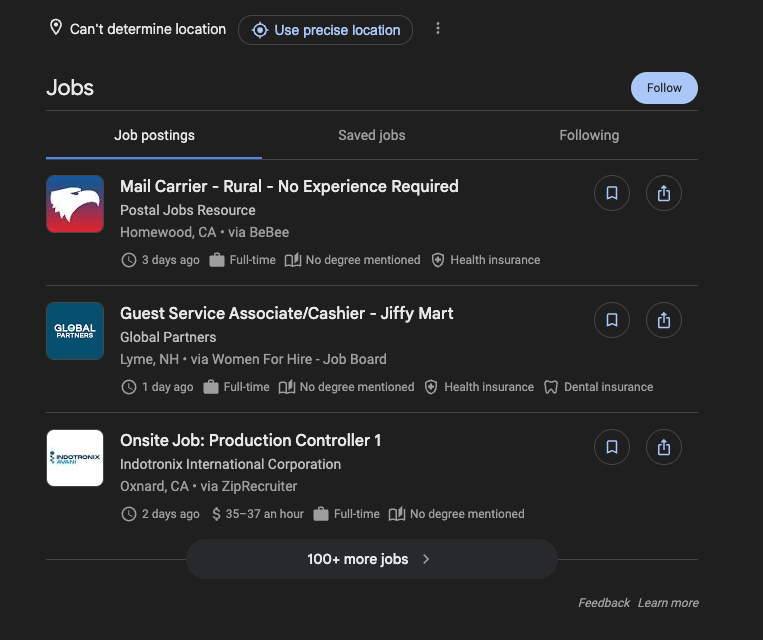
When Googlebot crawls your careers page, it reads both the visible HTML content and any structured data present in the page. If it finds a valid JobPosting schema object, it extracts the structured properties and evaluates whether the listing qualifies for Google for Jobs inclusion.
Qualifying listings are indexed and made available in Google for Jobs — the job search panel that appears prominently at the top of Google search results when someone searches for a job role. This panel allows users to filter by location, date posted, company, salary, and employment type — all powered by the structured data you provide.
The listing remains active in Google for Jobs until the validThrough date is reached, the page is removed, or the schema is updated or invalidated. The more accurate and complete your structured data, the higher the likelihood Google will surface your listing for relevant searches.
Why Job Posting Schema Is Important for SEO
Adding JobPosting schema markup is one of the highest-return technical SEO investments available to companies that hire through their own careers pages. The benefits extend beyond search rankings into tangible business outcomes.
Benefits for Google for Jobs Visibility
Without schema markup, your job listings are invisible to Google for Jobs — full stop. Google’s job search feature does not infer job postings from unstructured HTML alone. JobPosting schema is the prerequisite for participation.
Google for Jobs listings typically appear above traditional organic results, in a dedicated carousel at the top of the search results page. This prime real estate is only accessible through valid structured data. Companies that implement schema correctly effectively bypass traditional organic ranking competition for job-related queries.
Impact on Click-Through Rates and Applications
Rich results — search listings enhanced with structured data — consistently outperform plain blue links. Job listings that appear in the Google for Jobs panel include the company name, logo, salary range, location, and employment type — all visible before the user clicks. This enhanced display increases both click-through rates and the quality of applicants, since candidates self-select based on visible details.
Research from organizations tracking recruitment marketing consistently finds that listings appearing in Google for Jobs generate significantly more organic traffic than equivalent listings that rely solely on job boards or unstructured career pages.
How Schema Improves Job Discovery
Google for Jobs allows users to filter by multiple criteria simultaneously — location, salary range, employment type, company, date posted, and more. Every one of these filters is powered by structured data fields in your schema. Without accurate schema, your listing cannot match these filtered queries, even if the text of your job description would otherwise be relevant.
Schema also improves relevance matching. When Google understands the exact title, type, and location of a role, it can match the listing to a broader range of intent-aligned search queries — including long-tail searches like “remote senior data analyst contract roles” — expanding your candidate reach without additional advertising spend.
Required and Recommended JobPosting Schema Properties
Google distinguishes between required properties — those that must be present for a listing to be eligible for Google for Jobs — and recommended properties, which enhance the listing’s display and ranking potential. Understanding both categories is essential for a compliant, high-performing implementation.
Required Properties for Google Jobs
The following properties are mandatory. A listing missing any of these will be ineligible for Google for Jobs, and errors will be flagged in Google Search Console.
| Property | Description |
| title | The job title exactly as it appears on the page (e.g., “Senior Software Engineer”). |
| description | Full HTML or plain-text description of the role. Must be rich and detailed. |
| datePosted | The date the listing was published, in ISO 8601 format (e.g., “2024-01-15”). |
| hiringOrganization | Object with name (company name) and optionally sameAs (company URL) and logo. |
| jobLocation | Object with @type: Place and address using PostalAddress sub-type. |
Recommended Properties to Enhance Listings
While not required, these properties directly influence filtering, ranking, and the richness of your listing’s appearance in Google for Jobs. They should be treated as near-mandatory for competitive listings.
| Property | Benefit |
| baseSalary | Enables salary filter in Google for Jobs. Improves applicant quality and CTR. |
| employmentType | Enables job type filter. Values: FULL_TIME, PART_TIME, CONTRACTOR, TEMPORARY, INTERN, VOLUNTEER, PER_DIEM, OTHER. |
| validThrough | Expiry date in ISO 8601 format. Prevents stale listings from degrading index quality. |
| jobLocationType | Set to TELECOMMUTE for remote roles. Required for remote job visibility. |
| applicantLocationRequirements | Country/region restrictions for remote roles. Used with jobLocationType. |
| identifier | Unique internal ID for the posting. Helps Google deduplicate listings. |
| directApply | Boolean: true if application can be completed directly on your page. |
Remote Job and Location Guidelines
Google has specific rules for remote job listings that differ from on-site roles. Implementing these incorrectly is one of the most common causes of remote listings failing to surface in filtered remote job searches.
| Rules for Remote Job Schema |
| Set jobLocationType to “TELECOMMUTE” for fully remote roles. |
| Use applicantLocationRequirements to define eligible regions (e.g., AdministrativeArea for country-level). |
| For hybrid roles, include both jobLocation (physical address) and jobLocationType: TELECOMMUTE. |
| Do not omit jobLocation entirely for hybrid roles — Google requires at least one location. |
| For fully remote roles with no location restriction, omit jobLocation but include applicantLocationRequirements. |
Salary, Employment Type, and Expiry Date
These three properties deserve special attention because they directly affect filtering behavior in Google for Jobs and compliance with Google’s quality guidelines.
Salary (baseSalary): Provide salary as a MonetaryAmount or QuantitativeValue object with a value (or minValue/maxValue for a range), currency (ISO 4217 code, e.g., “USD”), and unitText (“YEAR”, “MONTH”, “WEEK”, “DAY”, or “HOUR”). Vague salary descriptions in plain text do not qualify — structured salary data is required.
Employment Type (employmentType): Use Google’s defined vocabulary values. Custom values are ignored. If a role is both part-time and contract, you may provide an array of values.
Expiry Date (validThrough): This is one of the most frequently neglected properties. If a listing has no expiry date and is not removed when the role is filled, it will continue to appear in Google for Jobs, resulting in wasted candidate time and a degraded experience. Set validThrough for every listing and implement a process to remove or unpublish expired listings promptly.
Build Your Job Posting Schema in SecondsGenerate valid JSON-LD markup for any job listing using our free Schema Builder. No coding required. Try the Free Schema Builder
How to Implement Job Posting Schema Markup
Implementing JobPosting schema is a five-step process. Each step builds on the previous one, from organizing your data through publishing and monitoring. Follow these steps in order for a reliable, maintainable implementation.
Step 1: Structure Your Job Data
Before writing any code, gather and organize all the information you will need for the schema object. Having this data structured in advance prevents common errors and ensures your schema is complete.
For each job listing, collect: job title, full description text, date posted, company name, company website URL, company logo URL, full job address (street, city, state/region, postal code, country), salary range and currency, employment type, application deadline, and any remote/hybrid details.
WARNING: Ensure every piece of information in your schema matches what is visibly displayed on the page. Google penalizes mismatches between structured data and visible content.
Step 2: Create JSON-LD Schema Markup
With your data organized, create the JSON-LD block. Below is a complete example incorporating all required and key recommended properties:
<script type="application/ld+json">
{
  "@context": "https://schema.org/",
  "@type": "JobPosting",
  "title": "Senior Software Engineer",
  "description": "<p>We are looking for an experienced engineer...</p>",
  "datePosted": "2024-03-01",
  "validThrough": "2024-06-01T00:00:00",
  "employmentType": "FULL_TIME",
  "hiringOrganization": {
"@type": "Organization",
"name": "Acme Corporation",
"sameAs": "https://www.acmecorp.com",
"logo": "https://www.acmecorp.com/logo.png"
  },
  "jobLocation": {
"@type": "Place",
"address": {
  "@type": "PostalAddress",
  "streetAddress": "123 Main Street",
  "addressLocality": "San Francisco",
  "addressRegion": "CA",
  "postalCode": "94105",
  "addressCountry": "US"
}
  },
  "baseSalary": {
"@type": "MonetaryAmount",
"currency": "USD",
"value": {
  "@type": "QuantitativeValue",
  "minValue": 120000,
  "maxValue": 160000,
  "unitText": "YEAR"
}
  },
  "directApply": true
}
</script>
Step 3: Add Schema to Your Web Page
Place the JSON-LD script block in the <head> section of the specific job listing page. While Google can technically read JSON-LD in the <body>, placing it in <head> ensures consistent parsing and is considered best practice.
If your site runs on a CMS (WordPress, Drupal, etc.), use a schema plugin or add the script through a custom field that injects it into the page head. For single-page applications, ensure the script is rendered server-side or injected before the page is indexed by Googlebot.
Skip the manual setupOur WordPress plugin auto-generates valid JobPosting schema for every listing on your careers page. Download the free plugin
Step 4: Validate Using Google Rich Results Test
Before publishing, always validate your schema using Google’s official tools. Validation catches syntax errors, missing required fields, and format violations that would prevent the listing from appearing in Google for Jobs.
| Validation Tools |
| Google Rich Results Test: https://search.google.com/test/rich-results |
| – Paste a URL or code snippet to check for errors and warnings |
| – Shows a preview of how the listing may appear in Google for Jobs |
| Schema.org Validator: https://validator.schema.org |
| – Validates schema.org compliance (broader than Google-specific rules) |
| Google Search Console: Search Appearance > Rich Results |
| – Shows production errors across all indexed pages |
Step 5: Publish and Monitor Performance
Once validated, publish the page. Google will typically discover and index the schema within hours to a few days, depending on crawl frequency for your site.
After publishing, monitor performance in Google Search Console under the Enhancements section, which includes a dedicated Job Postings report. This report shows the number of valid listings, warnings, and errors across your entire site. Check it regularly — especially after any site updates that might affect the schema output.
Track clicks and impressions for job-related queries in the Performance report to measure the impact of your schema implementation over time.
Best Practices for Job Posting Schema Optimization
Use Clear and Keyword-Optimized Job Titles
The title property should reflect the actual job title as candidates search for it — not an internal designation. “Software Engineer III” may be your internal grade, but candidates search for “Senior Software Engineer” or “Mid-Level Backend Developer.”
Avoid keyword stuffing in titles. “Software Engineer – Python – Django – Remote – Full Time – US” is likely to be flagged by Google’s quality systems and may result in the listing being penalized or excluded. Keep titles clean, natural, and representative of how real candidates would phrase their search.
Ensure Accurate Location and Remote Details
Location errors are among the most common causes of listing disqualification. Always use full PostalAddress objects with complete address details. Partial addresses (city only, state only) may pass validation but reduce filtering accuracy.
For remote roles, ensure jobLocationType is set to TELECOMMUTE and that applicantLocationRequirements accurately reflects eligible regions. A role listed as TELECOMMUTE with no applicantLocationRequirements implies global eligibility — use this only if it is accurate.
Keep Job Listings Updated and Fresh
Stale job listings are one of the most damaging schema issues for brand reputation. A candidate who finds and applies to a role that was filled months ago is frustrated, and their negative experience reflects on your employer brand.
• Set validThrough for every listing and enforce removal when the date passes.
• Implement an automated process to unpublish or redirect filled roles.
• Audit your careers page regularly for orphaned listings without valid schema.
• Update datePosted only when the listing content changes — do not artificially refresh it to game freshness signals.
Match Structured Data with Visible Content
Google’s structured data quality guidelines explicitly require that schema properties match the visible content on the page. If your schema says the salary is $120,000-$160,000 but the page does not display a salary, that is a violation. If the schema title differs from the visible page title, Google may discard the schema.
WARNING: Mismatches between structured data and visible content can result in manual actions against your site. Always ensure schema values are directly reflected in visible on-page content.

Common Job Posting Schema Errors to Avoid
Missing Required Fields
The most common reason a listing fails to appear in Google for Jobs is a missing required field. Google requires title, description, datePosted, hiringOrganization, and jobLocation at a minimum. Any missing field renders the entire schema object ineligible.
Check for missing fields using the Rich Results Test after every schema change. Search Console will also surface required field errors at scale, but it has a delay — the Rich Results Test provides immediate feedback.
Incorrect Date Formats
Google requires dates in ISO 8601 format. Common mistakes include using locale-specific formats (e.g., “March 1, 2024” or “01/03/2024”) which are not valid.
| Incorrect Format | Correct ISO 8601 Format |
| March 1, 2024 | 2024-03-01 |
| 01/03/2024 | 2024-03-01 |
| 2024-3-1 | 2024-03-01 |
| June 1, 2024 5:00 PM | 2024-06-01T17:00:00 |
Invalid Salary or Location Data
Salary must be provided as a structured MonetaryAmount or QuantitativeValue object — a plain text string like “$120k-$160k” in the baseSalary field is invalid. Similarly, location must be a full PostalAddress object, not a plain string like “San Francisco, CA.”
Currency codes must follow ISO 4217 (e.g., “USD”, “EUR”, “GBP”). Unit text must be one of Google’s accepted values: YEAR, MONTH, WEEK, DAY, or HOUR. Custom values are ignored and may cause validation errors.
Expired Job Listings Still Indexed
Allowing expired listings to remain indexed is both a user experience problem and a potential quality signal issue. Google tracks whether structured data on your site is accurate and current. A pattern of expired listings signals low data quality, which can affect how aggressively Google indexes your future listings.
When a role is filled or a listing expires, either remove the page entirely (returning a 404 or 301 redirect), remove the schema from the page, or update the validThrough date to a past value. Do not simply leave the page live with outdated schema.
Testing and Monitoring Your Schema Markup
Using Google Rich Results Test
The Google Rich Results Test is the primary validation tool for JobPosting schema. Here is how to use it effectively:
1. Navigate to https://search.google.com/test/rich-results in your browser.
2. Choose either “URL” (to test a live page) or “Code” (to test schema before publishing).
3. Enter the URL or paste your JSON-LD code and click “Test URL” or “Test Code.”
4. Review the results panel. Green checks indicate valid properties; red X marks indicate errors; orange triangles indicate warnings.
5. Expand the “Detected structured data” section to see all parsed properties and their values.
6. Click “Preview” to see a simulated Google for Jobs listing card for your schema.
7. Fix all errors before publishing. Address warnings where possible — they indicate fields that could improve listing quality.
For ongoing monitoring, use the Rich Results status report in Google Search Console (Search Appearance > Job Postings). This report provides a site-wide view of schema health, including trend data that helps identify when a CMS update or code change has inadvertently broken schema across multiple pages.
Conclusion
Job Posting Schema Markup is not a nice-to-have — it is the prerequisite for appearing in one of the most prominent job discovery surfaces on the internet. Google for Jobs reaches candidates at the precise moment they are searching for a role, and structured data is the only path to inclusion.
The implementation investment is modest, the validation tools are free and accessible, and the benefits — increased visibility, higher-quality candidates, improved click-through rates, and faster time-to-hire — are measurable and direct. By following the guidelines in this document, you can ensure your job listings are eligible, accurately represented, and continuously optimized for Google for Jobs.
The key takeaways are straightforward: implement all required properties, add recommended properties wherever possible, keep listings current and accurate, validate before publishing, and monitor through Search Console on an ongoing basis. Schema markup, done well, is a compounding SEO asset — every listing you publish correctly builds toward a stronger, more trusted structured data presence for your organization.
Frequently Asked Questions
Does Job Posting Schema work for third-party job boards like Indeed or LinkedIn?
No — schema only works on pages you own. Third-party boards manage their own structured data. For Google for Jobs visibility, implement JobPosting schema on your own careers page.
What happens if my job posting schema has errors — will the listing be removed?
The listing won’t be removed, but it may be ineligible for Google for Jobs. Errors (missing required fields, invalid formats) typically disqualify the listing; warnings reduce quality but don’t always exclude it. Fix errors before publishing using the Rich Results Test.
How long does it take for a job posting with schema to appear in Google for Jobs?
Typically hours to a few days — no guarantee. Speed up indexing by submitting the URL via Search Console’s URL Inspection tool and keeping the page in your XML sitemap.
Can I use Microdata or RDFa instead of JSON-LD for job posting schema?
Yes, Google supports all three formats, but JSON-LD is the recommended choice. It’s decoupled from your HTML, making it far easier to implement and maintain.
How do I handle job posting schema for multiple locations or hybrid roles?
For multiple locations, create a separate JobPosting object per location, ideally on separate URLs. For hybrid roles, include both jobLocation (physical address) and jobLocationType: TELECOMMUTE, plus applicantLocationRequirements if region restrictions apply.
Can I add multiple job postings on one page with schema, and how?
Yes — use separate <script type=”application/ld+json”> blocks per listing, or a single script with a JSON-LD array. That said, one dedicated page per listing is the preferred approach for cleaner Google signals and easier tracking.
<!-- Option 1: Separate script tags per listing -->
<script type="application/ld+json">{ "@type": "JobPosting", ... }</script>
<script type="application/ld+json">{ "@type": "JobPosting", ... }</script>

<!-- Option 2: Array in a single script tag -->
<script type="application/ld+json">
[
  { "@type": "JobPosting", ... },
  { "@type": "JobPosting", ... }
]
</script>¿Tu sitio ya tiene Schema Markup?
Genera structured data con IA, valida en tiempo real y mejora tus rich snippets — todo desde WordPress, sin tocar código.
- ✓ 17 tipos de schema
- ✓ Plan Free para siempre
- ✓ Compatible con WordPress 6.x