
How to Improve SEO on Your Website: 12 Steps That Actually Move Rankings
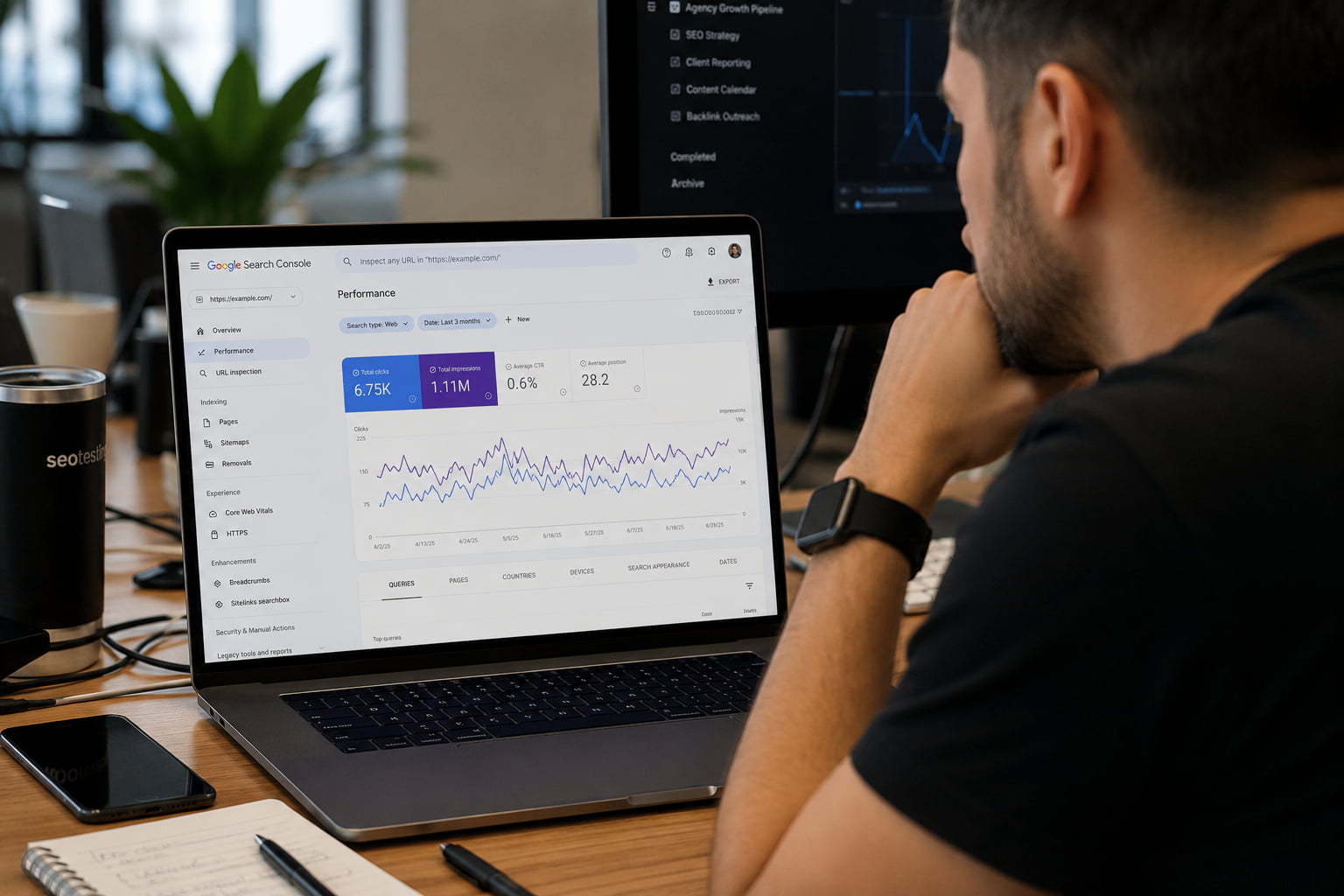
Five numbers written down before any changes are made. That snapshot is what turns the traffic went up into this change worked.
You have probably read five different lists of SEO tips. The problem was never the tips. It was that nobody told you what order to do them in.
This guide on how to improve SEO on your website is sequenced by dependency, not popularity. Publishing new content does nothing if Google cannot index the site.
In 2026 that sequence ends somewhere new: not just ranking, but getting cited by AI systems. A copyable checklist waits at the end.
How to Improve SEO on a Website (Short Answer)
To improve SEO on a website: fix crawling and indexing issues, match each page to search intent, optimize titles, headings and internal links, refresh existing content, add schema markup, earn authority signals, and track results in Search Console. Work in that order, because later steps depend on earlier ones.
- Get an SEO baseline before you change anything
- Fix your technical SEO foundation
- Match every page to search intent
- Tighten your on-page SEO
- Update and consolidate your existing SEO content
- Target low-competition keywords and build topic clusters
- Strengthen your internal linking for SEO
- Add schema markup so search engines and AI can read your pages
- Win featured snippets and AI Overview citations
- Build SEO authority off your site
- Make E-E-A-T visible on the page
- Track the SEO metrics that tell you it’s working
Each step assumes the one before it is done. Skipping ahead is how sites end up with beautifully optimized pages that Google never indexed.
Step 1: Get an SEO Baseline Before You Change Anything
Before you touch a single title tag, write down five numbers:
- Clicks over the last 28 days (Search Console)
- Impressions over the last 28 days (Search Console)
- Average position across the whole property
- Pages indexed versus pages not indexed
- Core Web Vitals status: how many URLs are Good, Needs Improvement, and Poor
This takes about fifteen minutes and it saves months of guessing.
Without a snapshot you cannot prove a gain was yours, and you cannot tell a drop you caused from a drop that came with a core update. When a client asks why traffic fell in week six, “here is what the site looked like in week one” is the only answer that holds up.
Everything you need is free: Google Search Console, Google Analytics 4, and PageSpeed Insights. Save the five numbers in a dated row in a spreadsheet. You will compare against that same row in step 12.
Step 2: Fix Your Technical SEO Foundation
The best page on the internet does not rank if Google cannot crawl it, index it, or load it. Technical SEO is not the part that wins you rankings. It is the part that makes every other step possible.
Three checks handle most of it: what Google has actually indexed, how fast the site loads, and whether duplicate URLs are splitting your signals.
Check What Google Actually Has Indexed
Open Search Console and go to Indexing > Pages. The first number to read is not clicks. It is indexed versus not indexed.
Having excluded pages is normal. Not knowing why is the problem. Open each exclusion reason and match it to an action.
| Exclusion reason | What it means | What to do |
|---|---|---|
| Crawled, currently not indexed | Google saw the page and chose not to index it | Deepen the content or fix the intent match, or consolidate it into a stronger page |
| Discovered, currently not indexed | Google knows the URL exists but has not crawled it | Add internal links and reduce how many clicks it sits from the home page |
| Duplicate without user-selected canonical | Equivalent versions exist and Google picked one for you | Add a self-referencing canonical tag (next section) |
| Excluded by ‘noindex’ tag | A noindex directive is on the page | Confirm it is intentional; if not, remove it |
| Redirect error | The redirect chain fails or loops | Fix the chain and leave a single hop |
| Blocked by robots.txt | A robots.txt rule stops the crawl | Review the rules and unblock anything Google needs to render the page |
Two housekeeping tasks close this out. Submit your XML sitemap in Search Console so Google has a clean list of the URLs you care about. Then open robots.txt and confirm it is not blocking CSS or JavaScript, because Google renders pages the way a browser does. This is the same diagnostic order Semrush recommends before touching content.
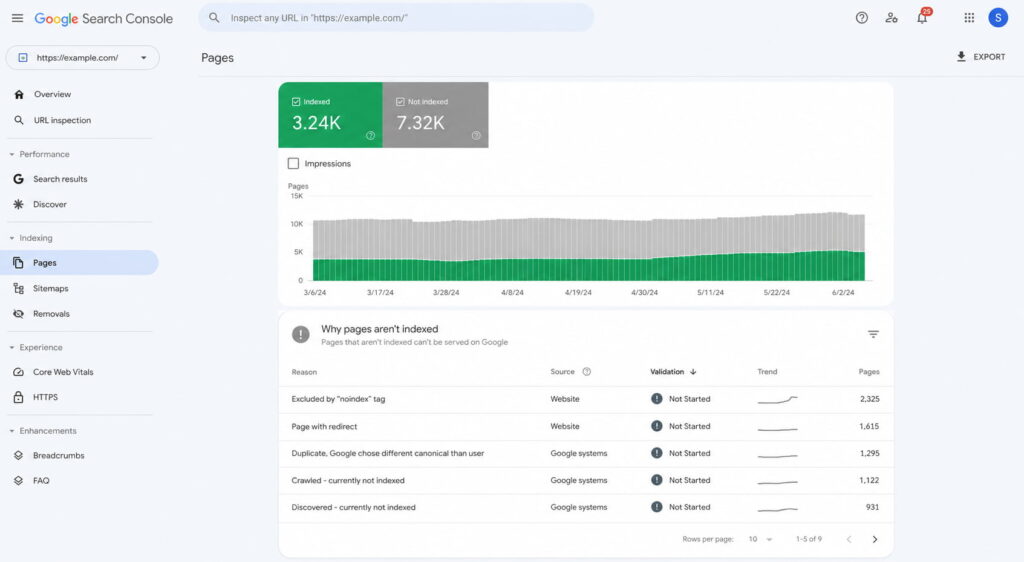
The exclusion reasons matter more than the totals. Each one maps to a different fix.
Improve Page Speed and Core Web Vitals
Three metrics carry the weight, and each one is simpler than its acronym suggests. LCP measures how long the main element takes to appear. INP measures how long the page takes to respond when someone interacts with it. CLS measures how much the layout jumps around while loading.
Fix them in this order, because that is roughly the order of impact:
- Compress images and serve them in WebP with lazy loading.
- Delete plugins you are not actively using.
- Turn on caching.
- Minify CSS and JavaScript.
- Put a CDN in front of the site.
- Check how heavy your WordPress theme is before you blame anything else.
Run PageSpeed Insights on the mobile tab, not desktop. Google indexes the mobile version of your site first, so the desktop score is the one that does not count.
One honest note, because most guides skip it. Speed is a tiebreaker, not a multiplier. Fixing Core Web Vitals will not move you ten positions on its own.
What it does do is stop you losing to an equally good page that loads faster, and stop visitors leaving before they read anything. Both are worth having. Neither is a ranking strategy.
Clean Up Duplicates With Canonical Tags
The same content is usually reachable at more URLs than you think. With and without a trailing slash. With UTM parameters attached from a paid campaign. Across paginated versions. On http and https.
Google sees each variation as a candidate and picks one. It does not always pick the one you wanted.
The fix is one line in the head of each page:
<link rel="canonical" href="https://example.com/your-page/" />That is a self-referencing canonical: the page names itself as the version to index. For the full syntax and the CMS-specific steps, see how to add a canonical tag.
Two things to know. A canonical is a signal, not a command, so Google can override it. And you can check whether it did: if Search Console reports “Duplicate, Google chose different canonical than user” for a URL, your tag was read and ignored, which usually means the two pages are more similar than you assumed.
Step 3: Match Every Page to Search Intent
The most common reason an optimized page does not rank has nothing to do with optimization. The page answers a different question than the one the search results reward.
There are four intents behind any query:
- Informational: the searcher wants to understand something. “what is schema markup”
- Navigational: the searcher wants a specific site or page. “search console login”
- Commercial: the searcher is comparing options before buying. “best crm software”
- Transactional: the searcher is ready to act. “buy standing desk”
Diagnosing intent takes two minutes and no tools. Search your keyword in an incognito window and look at what format dominates the top ten: a long guide, a listicle, a product page, a comparison, a video. That format is Google telling you what it has already decided the query deserves.
Then match it before a single word gets written.
“Best crm software” is the clearest example. The intent is commercial, and every result on page one is a comparison of multiple tools. A product landing page for one CRM will not rank there no matter how well it is written, because it answers a question nobody asked. If you want the full breakdown of the four types of search intent with more examples, that is covered separately.
For anyone briefing writers, this check belongs before the brief, not after the draft. Format decisions made after the writing are expensive.
Step 4: Tighten Your On-Page SEO
On-page is the only group of signals you control completely, and it is the fastest to fix. No third party has to agree, no algorithm has to recrawl a link graph.
Three areas cover almost all of it: what shows in the search result, how the page is structured, and how its URLs and images are named.
Title Tags and Meta Descriptions
The title tag rules are short. Keep it to 60 characters or fewer so it does not get truncated. Put the keyword near the front. Make it unique across the site.
And write it for the person deciding whether to click, not for the crawler.
Meta descriptions follow the same logic at 155 characters or fewer: state the benefit, then give a reason to click.
Here is the nuance almost nobody spells out. The meta description is not a ranking factor, and Google rewrites it most of the time anyway. Neither fact is a reason to skip it.
When Google keeps yours, it is the only sentence of sales copy you get in the search results. When it rewrites yours, it pulls from your page copy, so a page written with a clear benefit still wins.
Write it, then check how it renders before publishing. A free SERP simulator shows you the truncation point on both mobile and desktop, which is faster than publishing and squinting at the live result. If you are implementing these on WordPress, the mechanics of adding meta descriptions in WordPress are covered step by step.
Across a portfolio of client sites, this is also the one on-page task that batches well. Titles and descriptions can be rewritten in bulk without touching a single page’s content.
Heading Hierarchy (H1, H2, H3)
The rules fit in four lines. One H1 per page, containing the primary keyword. H2s for sections. H3s for subsections inside them.
Never skip a level.
The rule people break most often is using headings for styling. If a line is bold and large because it looks good, it should be styled, not marked up as an H3.
This matters more now than it did three years ago. AI systems extract answers block by block, and a clean hierarchy is what makes a single section quotable on its own. A page with a broken heading structure forces the model to guess where an idea starts and stops, and a guess is easy to skip in favor of a competitor who made it obvious.
Correct:
H1: How to Improve SEO on Your Website
  H2: Fix Your Technical Foundation
    H3: Check What Google Has Indexed
    H3: Improve Page Speed
  H2: Match Every Page to Search Intent
Broken:
H1: How to Improve SEO on Your Website
  H3: Check What Google Has Indexed
  H2: Fix Your Technical Foundation
    H4: Improve Page Speed
The second version says the same things. It just makes the relationships unreadable.
URL Slugs and Image Alt Text
Slugs should be short, lowercase, hyphenated, and built around the keyword. Drop stop words. Drop dates, because a slug with 2024 in it ages badly and gives you a reason to break a URL later.
The warning that matters: never change the slug of a page that already ranks without putting a 301 redirect in place. You reset the signals that URL accumulated, and rebuilding them takes months. If you want the full set of rules, we covered what an SEO slug is and how to change one safely.
Alt text has one job: describe the image for someone who cannot see it. That is it. Keyword stuffing alt attributes is a habit left over from 2012 and it helps nothing.
Every informative image needs alt text. Decorative images, the ones that carry no information, take an empty alt attribute so screen readers skip them instead of reading a filename aloud.
While you are in there, name the file before uploading. blue-cotton-tshirt-front.jpg is worth more than IMG_4471.jpg, and it costs three seconds.
Step 5: Update and Consolidate Your Existing SEO Content
This is the highest-return step in the guide, and it is the one most people skip in favor of publishing something new. The reason it works is simple: you are improving pages Google has already crawled, already indexed, and already assigned some level of trust.
Part A: refresh what is close.
In Search Console, filter your queries to positions 8 through 20. These are the queries one push away from the part of page one people actually click. Find the page receiving each one, then do four things to it:
- Update figures, screenshots and references that have gone stale.
- Add the subtopics the current top five cover and you do not.
- Fix the intent match if the format is wrong for the query.
- Change the publish date only if the content genuinely changed.
That last one is not a formality. Updating a date without updating the content is a well-known trick and it does not work.
Part B: consolidate what competes.
Keyword cannibalization is when several of your own URLs compete for the same query, and it is more common on older sites than anyone expects. To find it, open Search Console, filter by a specific query, then check the Pages tab. If more than one of your URLs is pulling impressions and clicks for that query, you have cannibalization.
The fix is uncomfortable but mechanical. Pick the strongest page, merge whatever is genuinely useful from the others into it, and 301 the rest.
Two mediocre pages competing for one query split every signal they have earned, internal links included. One consolidated page concentrates them. You are not deleting work, you are stopping it from competing with itself.
Step 6: Target Low-Competition Keywords and Build Topic Clusters
Two ideas that only work together.
Low-competition keywords first. Google Keyword Planner is free and gets you started. If you have Ahrefs or Semrush, filter for keyword difficulty under 30 with volume at or above 100. Those thresholds are not magic numbers, they are a starting filter that keeps you out of fights you cannot win yet.
A young site should not attack head terms. The pages ranking there have years of accumulated links and topical history behind them, and you will spend six months learning that. Long-tail queries convert better anyway, because the searcher has already narrowed what they want.
Topic clusters second. A cluster is one broad pillar page plus 10 to 30 subtopic pieces, where every subtopic links up to the pillar and across to its siblings. The structure is what builds topical authority, and topical authority is what separates a site that ranks from a site that publishes.
For a WordPress site selling a WooCommerce theme, a cluster might look like this. Pillar: a complete guide to WooCommerce product pages. Subtopics: product schema markup, product image optimization, variation handling, category page structure, and product page speed.
Each one is a real query someone searches. Together they tell Google you are not guessing about WooCommerce product pages.
Publishing five connected pieces on one subject beats publishing five disconnected pieces on five subjects, and the gap widens over time. More strategies for increasing organic traffic build on the same principle.
Step 7: Strengthen Your Internal Linking for SEO
Internal linking is the only authority lever you fully control. Backlinks depend on someone else saying yes. Internal links depend on you opening an editor.
Five rules cover it:
- Link from your highest-authority pages to the pages you want to lift, not the other way around.
- Use descriptive anchor text that names the destination. Never “click here” or “read more.”
- Give every important page at least 3 to 5 internal links pointing at it.
- Find your orphan pages, the ones with no internal links at all. Google barely crawls them and users never find them.
- Keep key pages within three clicks of the home page.
You can audit this without paying for anything. Search Console has a Links report that lists your internally most-linked pages in descending order. The pages you consider important that do not appear near the top of that list are the ones your site structure is quietly ignoring.
Fixing internal links costs an afternoon and no approvals. That combination is rare enough in SEO that it deserves to be higher on most people’s list than it is.
Step 8: Add Schema Markup So Search Engines and AI Can Read Your Pages
Schema markup, written in a format called JSON-LD, is a layer of structured data that tells Google and AI models what each thing on your page actually is.
This is a product. This is its price. This is the author. This is a review, and this is its rating.
Without that layer, machines infer all of it from your text. They are decent at inferring, and “decent” is not what you want deciding whether your product’s price shows up in a search result.
Three reasons it earns a place in this list, and one honest caveat.
It makes you eligible for rich results. Star ratings, FAQ dropdowns, prices, breadcrumbs. These raise click-through rate without your position changing at all. It is the only lever in this guide that improves the outcome without moving the ranking.
It makes you readable to AI search. AI Overviews are no longer an experiment. How often they appear depends heavily on who is measuring: Conductor’s analysis of 21.9 million searches in the first quarter of 2026 put the figure at 25.11%, while trackers measuring through March 2026 report figures approaching 48%. The spread comes from different keyword sets, different geographies, different sample sizes and different measurement dates, which is why a single number is the wrong thing to quote.
What is consistent is the gap between being cited and not being cited. Seer Interactive, analyzing 5.47 million queries across 53 brands between January 2025 and February 2026, found that pages cited in AI Overviews get 120% more clicks per impression than uncited pages, though they still trail pages on AI-free result pages by 38%.
It disambiguates entities. A model needs to know that “Apple” in your article is the company, that the review belongs to the product and not the page, that the author is a person with credentials. Structured data states all of that explicitly. Explicit is what a model needs before it cites you with confidence instead of citing someone clearer.
Now the caveat, because it gets overstated constantly. Schema markup is not a direct ranking factor. It improves understanding, it makes you eligible for rich results, and it makes you easier to cite. It does not move you up the page by itself.
For agencies, schema has one property nothing else in this guide has: it standardizes at the template level. One correct Article template applies to every post on a site, and the same template can be replicated across a portfolio without rewriting a word of content. Our full guide on how to use schema markup goes deeper on each type.
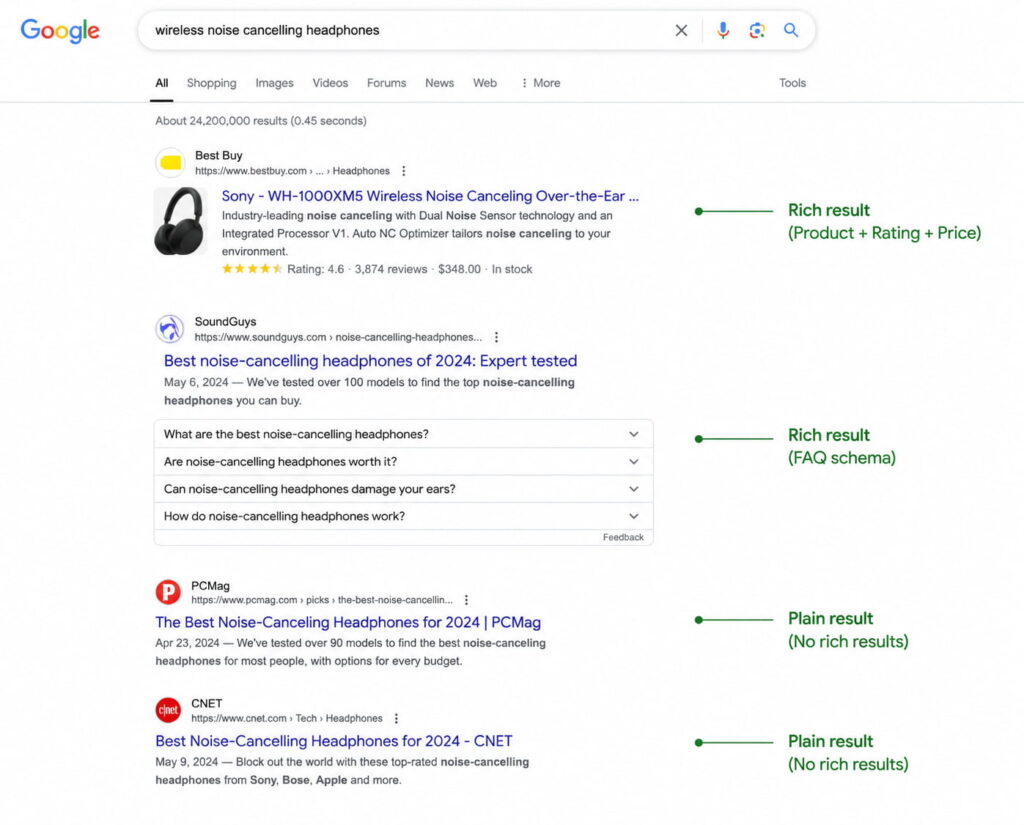
The top two results are not ranked higher because of schema. They just take up more of the screen and answer more of the question before the click.
Which Schema Types to Add First
This list is ordered by return, not alphabetically. If you only get to three, do the first three.
| Schema type | When it applies | What it can earn you |
|---|---|---|
Organization (or LocalBusiness) | On the home page of any site. Use LocalBusiness instead if there is a physical address | Knowledge panel eligibility, logo and contact details in search |
Article | On every blog post | News and article carousel eligibility, author attribution |
Product + Review | On every ecommerce product page | Price, availability and star ratings in the result |
FAQPage | On pages with real questions visible to the reader | Expandable questions under your result |
BreadcrumbList | Site-wide | A readable navigation path instead of a raw URL |
Person | On author pages and bios | Reinforces the authorship signals covered in step 11 |
Service, Event, Recipe, HowTo, JobPosting, Course, VideoObject | Depending on what the site does | Format-specific rich results for each type |
One rule overrides all of them: only mark up what is visibly on the page. Google’s structured data guidelines are direct about it. Do not add structured data about information that is not visible to the user, even if the information is accurate, and violating a quality guideline can stop syntactically correct markup from producing a rich result or get it flagged as spam.
The temptation is real, especially with reviews and prices. It is also the fastest way to lose rich result eligibility across an entire site.
How to Add Schema in WordPress Without Code
Three routes, with honest trade-offs.
| Route | Control | Effort per page | Scales to a whole site? |
|---|---|---|---|
Hand-written JSON-LD in the <head> | Total | High | No |
| Your SEO plugin’s schema module | Low | Low | Partially |
| A dedicated schema plugin | High | Low | Yes |
Route 1, writing JSON-LD by hand. Total control, and a good exercise once. It also breaks the moment someone edits a template, and nobody maintains it across 400 product pages.
Route 2, your SEO plugin’s schema module. Yoast, Rank Math and AIOSEO all ship one. They cover the basics competently. They also support a small number of types and give you limited control over individual fields, which is fine until you need Product with variations or a Person with real credentials.
Route 3, a dedicated schema plugin. This is the category built for the problem: generate JSON-LD per template, inject it automatically, manage it in one place.
Schemafy is one option in that category. It includes a visual builder covering 16 Schema.org types, AI-assisted generation that runs on your own ChatGPT or Claude API key, a manual JSON editor for the edge cases the builder does not cover, a site scan that finds pages missing schema with filters by content type and bulk selection, automatic handling of WooCommerce products, and a single screen where every applied schema can be reviewed and edited.
The objection worth answering directly, because it stops most agencies from testing anything: you do not have to uninstall your current SEO plugin. Compatibility is declared with Yoast SEO, Rank Math, AIOSEO and WooCommerce, which means this is a change you can trial on one client site without renegotiating the stack on the other eleven.
If you want to see what valid markup looks like before installing anything, there is a free schema markup generator and a JSON-LD editor that both run in the browser.
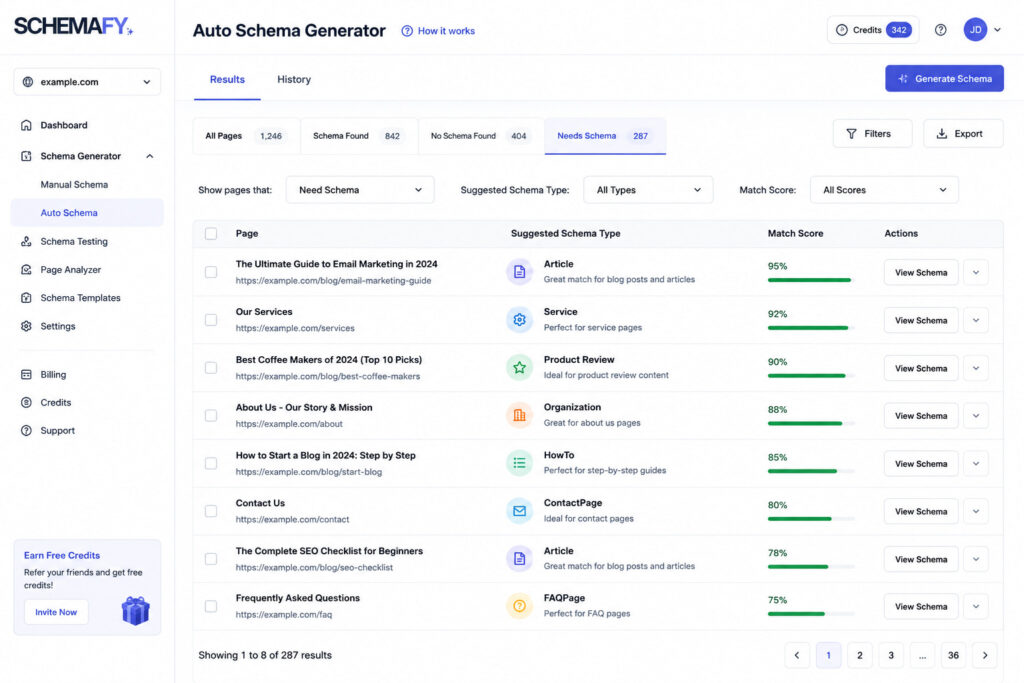
A site scan turns “we should probably add schema” into a list of 412 specific pages and the type each one needs.
Validate Before You Move On
Run every template through two validators: Google’s Rich Results Test and the Schema Markup Validator at schema.org. Templates, not pages. If the Article template is correct, all 300 posts using it are correct.
Then wait. One to two weeks after deployment, open the Enhancements section in Search Console. That is when Google has reprocessed enough of the site to tell you what it actually accepted, which is not always what the validator approved.
Fix errors before warnings. Errors block the rich result entirely. Warnings are recommended fields you left empty, which reduce your chances without eliminating them.
The most common failure has nothing to do with syntax. It is duplicate schema: your SEO plugin and your schema plugin both emit an Article block for the same page, and Google gets two conflicting descriptions of one thing. If a validator shows two of the same type on one URL, turn one of them off before you debug anything else.
Step 9: Win Featured Snippets and AI Overview Citations
Featured snippets look like luck. They are closer to a format-matching exercise, and the process repeats across every client you have.
- Find the queries where you already rank in the top 10 but do not hold the snippet. Search Console gives you the ranking queries; a manual search tells you who holds position zero.
- Read the format of the current snippet. Paragraph, numbered list, bulleted list, or table. Google has already decided which one this query deserves.
- Rebuild that format on your page. A question-form heading, followed immediately by a direct answer of 40 to 60 words, with no warm-up sentence in between.
The reason this works is worth understanding. Google is not picking the best page on the internet and quoting it. It is extracting the block that best fits a format it already chose. Your job is to hand it a clean block.
The same discipline carries over to AI systems, with one addition. Models pull self-contained passages, so every section needs to survive being read in isolation. That means explicit definitions instead of pronouns pointing back three paragraphs, numbers with a citable source attached, and consistent structure from section to section. The generative engine optimization playbook goes deeper on this.
Set expectations honestly while you do it. Being cited in an AI Overview does not return the traffic a blue link produced in 2019. The Seer data above shows the gap between cited and uncited pages is large, and the gap between AI result pages and clean ones is also real. Both facts are true at once.
Step 10: Build SEO Authority Off Your Site
Off-site authority is where most SEO advice gets either vague or reckless. Five approaches are worth your time, and none of them involve buying anything.
Convert unlinked mentions. Someone already wrote your brand name without linking it. A polite email asking for the link converts a meaningful share of these, and it is the cheapest link acquisition that exists.
Be a source. Journalist request platforms like Qwoted and Help a B2B Writer send daily queries from writers who need an expert quote. Answering three a week from a real practitioner earns placements that no outreach sequence will.
Build linkable assets. Original data, a calculator, a template someone can use. People link to things they need again.
Guest post on real sites in your niche. Real means it has its own audience and would exist without link sellers.
Fix your directory profiles. For local clients, identical name, address and phone across every listing. Inconsistent NAP is a slow leak that nobody notices until a rankings audit.
One update for 2026: in AI search, unlinked brand mentions carry weight as an entity signal, not just linked ones. That changes the economics of outreach. Getting mentioned is cheaper than getting linked, and it is no longer worth nothing. The full breakdown of off-page signals that count covers how to measure them.
And the obvious warning, stated once: buying links violates Google’s spam policies. The upside is temporary and the downside lands on a client’s site, not yours.
Step 11: Make E-E-A-T Visible on the Page
Start with the correction, because this is one of the most misrepresented ideas in SEO. E-E-A-T, meaning Experience, Expertise, Authoritativeness and Trust, is not a measurable ranking factor. It is the framework human evaluators at Google apply when they rate results, and those ratings do not directly affect rankings. They feed back into algorithm refinement.
That does not make it useless. It makes it indirect. The signals that communicate E-E-A-T are entirely implementable, and most sites implement none of them:
- Real author bios with actual credentials and a link to a full profile page
Personmarkup on those profiles, and a populatedauthorfield inside theArticleschema- Publish and last-updated dates visible to readers, not buried in metadata
- Sources cited with working links, especially for any claim carrying a number
- Complete About and Contact pages with a real address and a real human named
- A published editorial policy explaining who reviews content and how
Look at that list again and notice how much of it is structured data. An author bio at the bottom of a post is a paragraph. The same bio with Person markup and an author reference from the article is a machine-readable statement that this named individual with these credentials wrote this specific piece.
That is the link between this step and step 8. Trust signals a human can read are worth something. Trust signals a machine can parse are worth something in a search result.
Step 12: Track the SEO Metrics That Tell You It’s Working
Different signals move at different speeds, so checking everything weekly just generates noise.
| Cadence | What to check | Where |
|---|---|---|
| Weekly | Impressions, clicks, and queries you have not ranked for before | Search Console, Performance report |
| Monthly | Average position for target pages, CTR per page, indexed page count, conversions from organic | Search Console plus your analytics |
| Quarterly | Referring domains, authority metrics, visibility in AI answers | A third-party SEO tool |
Two vanity metrics deserve to be ignored. The rank of one isolated keyword moves daily for reasons unrelated to your work. Total traffic without segmentation can rise on a viral piece that converts nobody while your commercial pages quietly decline.
Then close the loop. Open the spreadsheet row from step 1 and compare the same five numbers. Not similar numbers, the same ones, measured the same way, over the same 28-day window. That comparison is the only thing that tells you whether the last three months of work did anything, and it is why the baseline came first.
For tracking visibility inside AI answers specifically, the tooling is still young and uneven. We tested AI SEO tools by use case to sort out which ones measure something real.
How Long Does It Take to See SEO Improvements?
Most sites see measurable movement in three to six months, and six to twelve months in competitive niches. Google’s own guidance has long been similar: Maile Ohye, then a Developer Programs Tech Lead at Google, put it at “four months to a year to help your business first implement improvements and then see potential benefit.”
The average hides a lot of variance, and the variance is mostly about what you changed.
Technical fixes and title tag rewrites can show up within days or weeks, because Google only has to recrawl a page it already trusts. New content takes months, because it has to be discovered, indexed, evaluated and then compared against pages that have been there for years. Authority takes longest of all, because it depends on other people acting.
One number is worth showing any client who thinks six months is slow. Ahrefs studied 2 million random keywords and found the average top 10 page was over 2 years old, with pages in position one averaging close to 3 years. Only 5.7% of the pages studied reached the top 10 within a year for even one keyword. A later Ahrefs update put the figures higher still.
You are not competing against pages published last month. You are competing against pages that have been compounding since 2022. WebFX reaches similar conclusions on typical timelines.
Your Website SEO Improvement Checklist
Copy this into a project ticket and work down it.
This week
- Record the five baseline numbers in a dated spreadsheet row
- Review indexed versus not indexed in Search Console and open every exclusion reason
- Submit the XML sitemap
- Confirm robots.txt is not blocking CSS or JavaScript
- Add self-referencing canonical tags
- Run PageSpeed Insights on mobile
This month
- Check search intent against the live SERP for every target page
- Rewrite title tags and meta descriptions
- Fix broken heading hierarchy
- Clean up slugs and add real alt text
- Add internal links pointing at the pages you want to lift
- Add schema markup to the home page and every post
This quarter
- Refresh the pages ranking in positions 8 to 20
- Consolidate cannibalizing URLs and 301 the losers
- Publish one new topic cluster
- Chase featured snippets on queries where you already rank top 10
- Convert unlinked brand mentions and pitch two source requests a week
- Make E-E-A-T signals visible: bios, dates, sources, editorial policy
Ongoing
- Compare against the baseline monthly
- Revalidate schema after every template change
- Update figures and screenshots before they go stale
Start With the Layer Most Sites Skip
Most sites work through steps 1 to 7 and stop there. The content is good, the technical foundation is clean, and Google and every AI model are still inferring what each page means from raw text.
Structured data is the cheap step that makes everything above it legible. Try the free schema generator on one page to see what valid markup looks like, or install Schemafy to generate, validate and inject JSON-LD across WordPress without writing code.
Does your site already have Schema Markup?
Generate structured data by template, with AI or in bulk, and verify it with Google's Rich Results Test — all from WordPress, no code.
- ✓ 16 schema types
- ✓ Free plan, forever
- ✓ Keeps Yoast / Rank Math
Frequently Asked Questions About Improving SEO
These answers are marked up with FAQPage schema, which is exactly what step 8 recommends doing on any page with real questions on it.
How can I improve my website’s SEO for free?
Most high-impact SEO work costs nothing. Use Google Search Console to find indexing errors and pages ranking 8–20, rewrite title tags and meta descriptions, fix internal links, refresh outdated content, compress images, and add schema markup with a free generator. Paid tools speed up research, not results.
What is the fastest way to improve SEO?
Updating pages that already rank on page two. Find queries in positions 8–20 in Search Console, improve the matching page’s intent alignment, title tag and depth, then request reindexing. These pages already have authority, so gains often show in weeks instead of months.
How long does it take to improve SEO?
Most sites see measurable movement in three to six months, and six to twelve months in competitive niches. Google states meaningful results typically take four to twelve months. Technical fixes and title tag changes can show within days; new content and authority building take considerably longer.
Does schema markup improve SEO rankings?
Schema markup is not a direct ranking factor. It helps search engines and AI systems understand what your page contains, which makes you eligible for rich results like star ratings, FAQs and breadcrumbs. Those richer listings raise click-through rate and improve your odds of being cited in AI answers.
How often should I update my website for SEO?
Audit technical health monthly, review top-performing content quarterly, and refresh pages with outdated statistics or declining traffic at least once a year. Update only when you’re adding real value. Changing a publish date without changing the content does nothing for rankings.
Can I improve my website’s SEO myself without an agency?
Yes. Steps one through eight of this guide, from the baseline and technical fixes through intent matching, on-page optimization, content refreshes, internal linking and schema markup, are all DIY with free tools. Agencies mainly add speed, link building capacity and strategy at scale, not secret techniques.
Does page speed affect SEO?
Yes, but as a tiebreaker rather than a main driver. Google uses Core Web Vitals as a page experience signal, and slow pages lose visitors before they read anything. Test on mobile with PageSpeed Insights, since Google indexes the mobile version of your site first.

Fabián Tinjacá is the CTO of Schemafy and the engineer who turned an early prototype into a production plugin. He owns the technical side end to end: the plugin core, the schema generation engine, releases, and bug fixes. He also built the Schemafy website in Astro. His take: most WordPress SEO plugins are slow because they try to be five tools at once. Fabián builds Schemafy to do structured data and meta well without dragging down the sites it runs on.