
How to Optimize Crawl Budget: A Practical Guide for 2026
 By Eddie Casas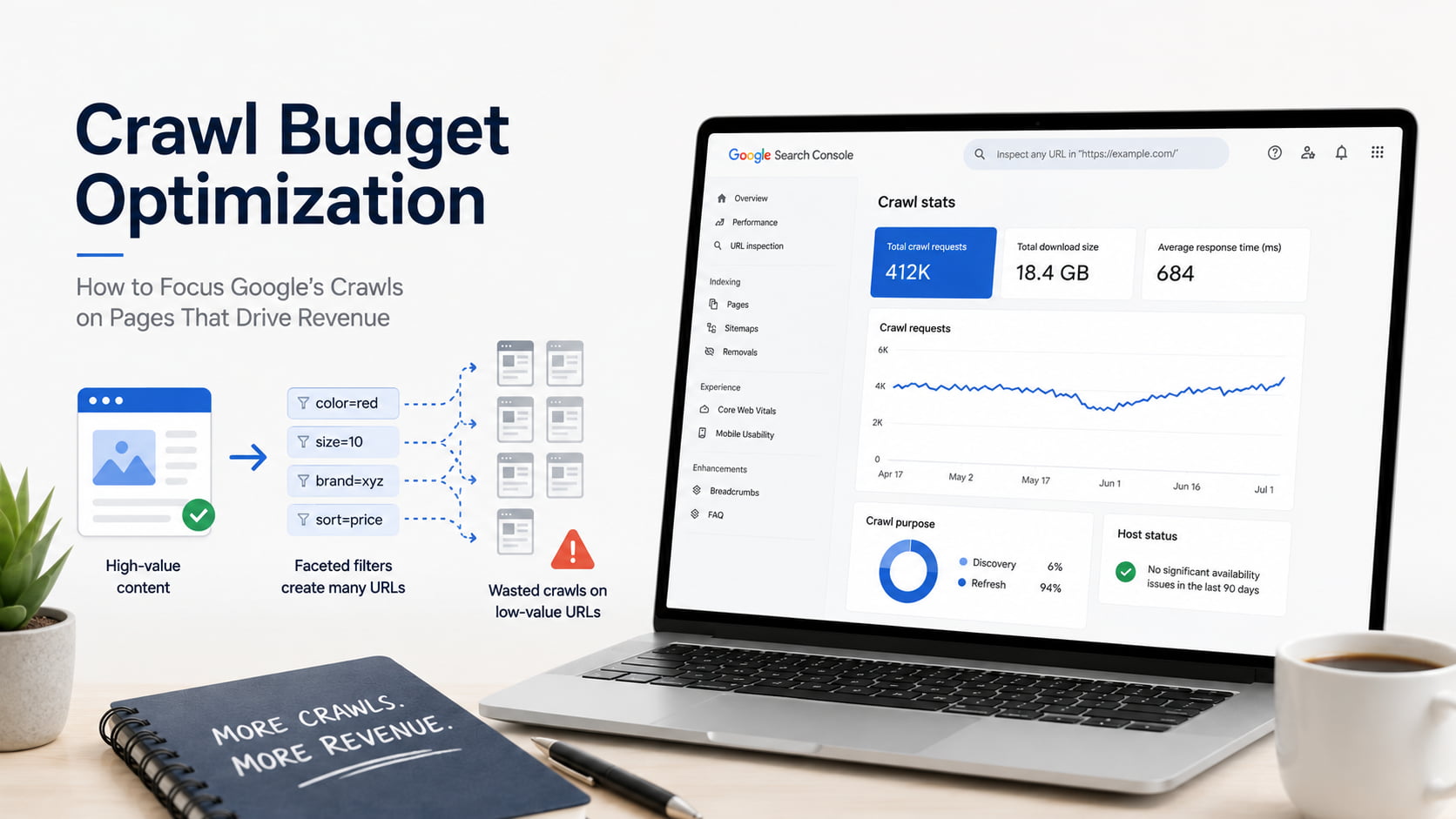
Most crawl budget guides assume you already have a crawl budget problem. Across ten client stores, maybe two actually do.
Crawl budget is the set of URLs Google can and wants to crawl on your site. Optimizing it means Google spends those requests on the pages that make money instead of on filter URLs nobody searches for.
This guide starts by telling you honestly whether it applies to you, then gives you the eight fixes that matter.
Caption: Three Search Console checks tell you which client sites deserve a crawl budget audit and which do not.

What is crawl budget?
Crawl budget is the set of URLs Google can and wants to crawl on your site over a given period. Google sets it with two things: how much your server can handle, and how much Google wants your content. Google treats each unique hostname as its own site with its own budget.
That last detail catches people managing portfolios. Your store and your blog subdomain do not share a budget, so a bloated subdomain is not stealing crawls from the money pages (Google Search Central).
Here is the rough arithmetic worth running before you do anything else. Take your indexable URLs and divide them by the average daily requests in your Crawl Stats report. If the answer is close to ten, Google needs more than a week to walk your site once. That is a field heuristic, not official guidance, but it is the fastest way to decide whether the rest of this guide is worth your afternoon.
Crawl capacity vs. crawl demand
Crawl capacity is how many simultaneous connections Googlebot will hold open without hurting your server. It goes up when your responses stay fast and stable, and it comes down when latency climbs or you return server errors and rate-limiting codes. This is the hosting lever.
Crawl demand is how much Google wants to crawl you. It is driven by how many URLs Google thinks you have, how popular those URLs are, and how stale they look. Google is direct about which part you own: perceived inventory is “the factor that you can positively control the most.” This is the URL inventory lever, and it is where seven of the eight fixes below live.
One detail almost nobody writes down: the crawl capacity limit is shared across all of Google’s crawlers, while crawl demand is calculated per crawler. If AdsBot is hammering a client store, it is taking capacity away from Googlebot.
Does crawl budget actually matter for your site?
For most sites, no. Google says so plainly at the top of its own guide: if your pages get crawled the same day you publish them, you do not need to read it.
The guide is written for two profiles. Large sites with 1 million or more unique pages that change roughly weekly, and medium or larger sites with 10,000 or more unique pages that change daily. Search Console is blunter still: “if you have a site with fewer than a thousand pages, you should not need to use this report or worry about this level of crawling detail” (Search Console Help).
This is not new. When Gary Illyes published Google’s canonical explanation back in 2017, the first thing he did was warn that crawl budget is not something most publishers need to worry about, and that sites with up to a few thousand URLs get crawled efficiently. Nine years later the message has not moved.
| Site profile | Typical crawlable URLs | Change frequency | Does crawl budget matter? |
|---|---|---|---|
| Brochure or service site | Under 100 | Rarely | No |
| Blog or small store | 100 to 1,000 | Weekly | No |
| Mid-size WooCommerce store | 1,000 to 10,000 | Weekly | Rarely, unless facets are crawlable |
| Large store with open faceted navigation | 10,000+ | Daily | Yes |
| Marketplace or programmatic site | 1M+ | Weekly or faster | Yes |
Read the second column carefully, because it says crawlable URLs, not products. A WooCommerce store with 800 products and five open filters is not an 800-page site. It is a site with tens of thousands of crawlable URLs wearing an 800-product costume. That is how a portfolio of ten clients produces two or three real cases.
If none of your clients qualify, the principles still earn their keep. The same URL sprawl that burns budget on a large site delays indexing on a small one.
How to check if you have a crawl budget problem
Four checks, ordered by what they cost you in minutes. With ten accounts, the order matters more than the thoroughness.
- Open the Crawl Stats report. It lives under property settings and only works on root-level properties. Read three numbers: total crawl requests, average response time, and host status. The report covers the last 90 days.
- Run the ratio. Compare average daily requests against your indexable URL count. Then check the Crawl purpose breakdown, which splits requests into Discovery (a URL Google has never crawled) and Refresh (a recrawl of something known). If Refresh eats almost everything while Discovery sits near zero and you are publishing new products weekly, you have found your symptom.
- Check the Pages report. “Discovered – currently not indexed” and “Crawled – currently not indexed” are normal in small numbers. Thousands of them, with product URLs inside, is the clearest signal Search Console will give you.
- Read the server logs. Log-file analysis is the gold standard because it is the only method that tells you what share of Googlebot’s requests went to junk. It is also the only one that needs hosting access, a parser and a couple of hours per account. The red flag is unmistakable: most requests landing on URLs with filter and sort parameters instead of on product and category pages.
The first three checks take about fifteen minutes per property. Across ten clients that is one morning, and you finish it knowing exactly which two accounts deserve the log analysis.
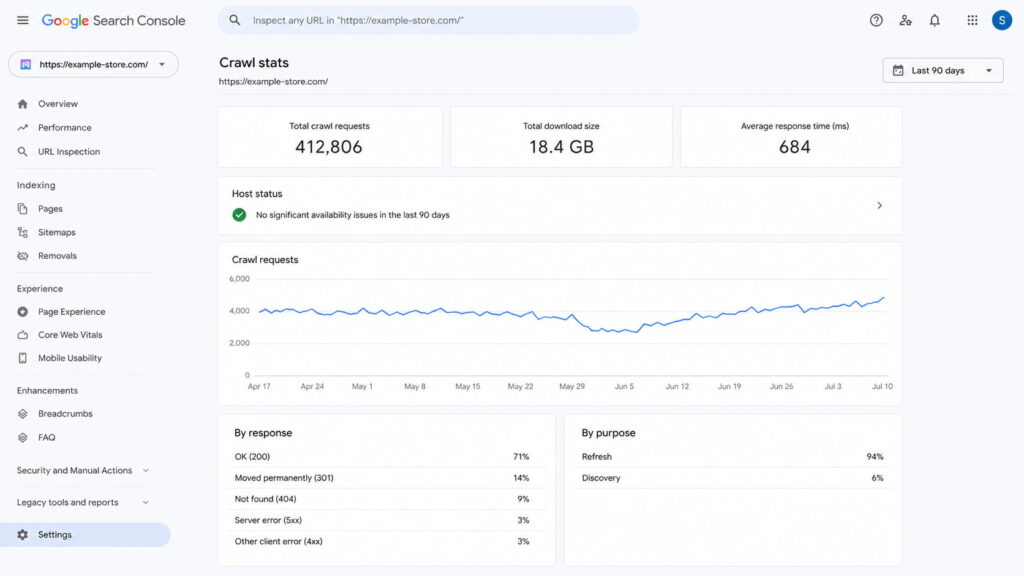
Caption: Refresh at 94% and Discovery at 6% on a store publishing weekly is what a crawl budget symptom looks like.
How to optimize your crawl budget: 8 steps
The fixes below are ordered by impact and follow the principle Google puts first in its own guide: manage your URL inventory before you touch anything else.
- Block low-value URLs in robots.txt.
- Consolidate duplicate content onto one canonical URL.
- Tame faceted navigation and URL parameters.
- Flatten redirect chains to a single hop.
- Fix soft 404s and return proper status codes.
- Clean and update your XML sitemap.
- Link internally to your priority pages.
- Speed up server response and rendering.
1. Block low-value URLs in robots.txt
This is the highest-impact move because it removes entire URL spaces from consideration instead of fixing URLs one at a time. On WordPress those spaces are predictable: admin paths, cart and checkout, internal site search, staging subdirectories and sort parameters.
User-agent: *
Disallow: /wp-admin/
Disallow: /cart/
Disallow: /checkout/
Disallow: /*?s=
Disallow: /*?orderby=
One clarification that trips up half the industry: robots.txt controls crawling, not indexing. Blocking a URL does not remove it from the index if Google already has it. Google does note that blocking “significantly decreases the chance the URLs will be processed by other Google systems,” so it is not useless for index hygiene, but it is not a deindexing tool.
Two warnings. Do not block CSS or JavaScript that Google needs to render your pages, which on a WooCommerce theme usually means leaving /wp-content/ alone. And do not reach for crawl-delay: the non-standard rule is not processed by Google’s crawlers at all.
In a portfolio, this file is the one fix that replicates almost unchanged across clients running the same stack.
2. Consolidate duplicate content
Duplicates make Google spend several requests on the same content. Google lists consolidation as the first item under URL inventory management for exactly that reason: the goal is to focus crawling on unique content rather than unique URLs.
On WordPress the usual sources are http and https or www and non-www resolving in parallel, inconsistent trailing slashes, session IDs appended by a plugin, and above all the tag and category archives your theme generates automatically. A WooCommerce store with 40 product tags is quietly publishing 40 near-identical listing pages.
Fix it in this order: canonical tags pointing at the version you want, 301 redirects for versions that should not exist at all, and internal links that consistently use the chosen URL. A clean URL structure makes the third step much cheaper.
The nuance that separates a technical SEO from the average guide: canonical is a signal, not a directive. Google may choose a different URL, and it will keep crawling the non-canonical versions for a while before the volume drops.
3. Tame faceted navigation and URL parameters
Do the arithmetic once and this section sells itself. Five filters with four values each, combinable in any order, produce over a thousand URL combinations before you count sorting and pagination. Google’s own term for the result is an infinite URL space, and it causes two specific harms: overcrawling of useless URLs, and slower discovery of the new ones you care about.
Fix it in Google’s recommended order.
Start by disallowing the filter parameters in robots.txt if you do not need those URLs indexed. Google’s own example blocks each parameter and whitelists the unfiltered listing:
User-agent: Googlebot
Disallow: /*?*color=
Disallow: /*?*size=
Allow: /*?products=all$
If your theme allows it, switch filters to URL fragments instead of parameters. Google generally does not crawl fragments, so the filtering stops affecting crawling entirely.
Canonical tags to the clean category and rel="nofollow" on facet links are the second-line options, and Google is explicit that both are less effective long term. nofollow in particular only works if every anchor pointing at that URL carries it, anywhere on the web.
Two details worth writing on a sticky note. The URL Parameters tool in Search Console is gone, so any process that still expects it needs updating. And when a filter combination returns nothing, serve a 404 at that URL rather than redirecting to a shared error page.
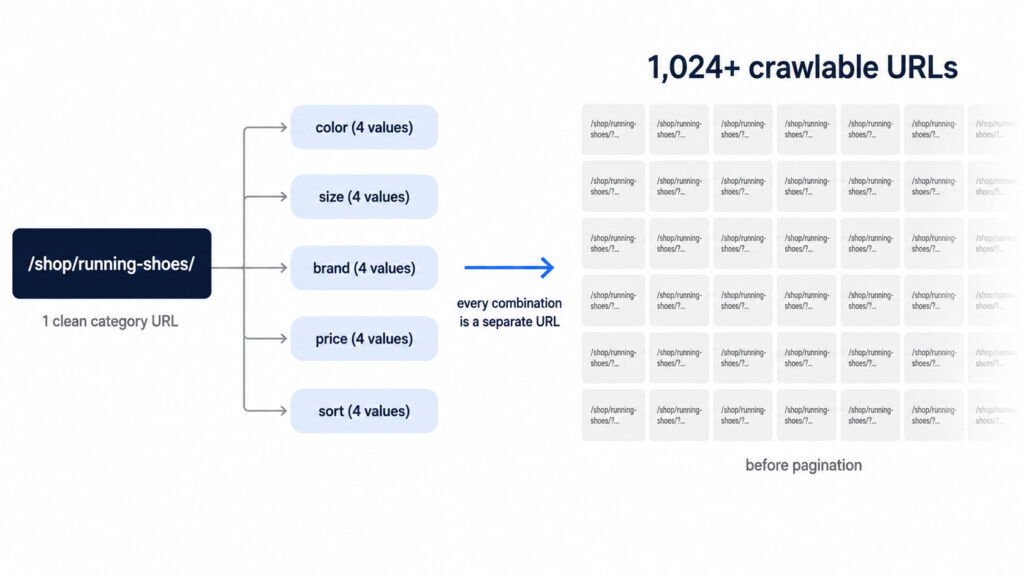
Caption: Five filters with four values each generate over a thousand URLs from a single category page.
4. Flatten redirect chains and fix broken links
Google counts every hop in a redirect chain as a separate request. If page1 redirects to page2 which redirects to page3, Search Console records three requests to deliver one page. A migrated client site with three-hop chains is spending triple to serve the same catalog.
Point internal links straight at the final URL, flatten inherited chains to a single hop, and crawl the site with Screaming Frog, Sitebulb or Ahrefs to find them, and if you are still assembling that stack there is a breakdown of SEO tools by use case. On sites you inherit after a migration, chains are the default finding rather than the exception.
Now the correction, because most guides on this topic get it backwards. Google states that pages serving 4xx status codes, except 429, do not waste crawl budget. Google attempted the request, got a status code and no content, and moved on. Broken internal links are still worth fixing for user experience and internal link equity, but they are not a crawl budget line item. If you want the full treatment of those, fix the underlying SEO issues as a separate pass.
What genuinely hurts is 5xx errors and timeouts. They do not spend your budget, they shrink it: a meaningful volume of server errors signals poor health and Google slows crawling in response.
5. Fix soft 404s and error pages
A soft 404 is a page that returns HTTP 200 while being effectively empty or missing. On WooCommerce the classic case is a category page whose products all went out of stock and which now returns a successful response with zero results.
These are expensive because the status code tells Google there is content worth revisiting. In Google’s words, “soft 404 pages will continue to be crawled, and waste your budget.”
Return a 404 or 410 for pages that are genuinely gone, 301 the ones with a real replacement, and watch the soft 404 rows in the Search Console Pages report. The contrast is worth internalizing: a 404 is a strong signal not to crawl that URL again, while a blocked URL stays in the crawl queue much longer and gets recrawled once the block lifts.
6. Keep your XML sitemap clean and current
Your sitemap is the list of URLs you are declaring important, and Google reads it regularly. That only works if the list is honest.
A sitemap stuffed with noindexed, redirected and 404ing URLs does two kinds of damage. It spends crawl requests on URLs you did not want crawled, and it erodes the file’s usefulness as a priority signal.
Four rules cover it. Include only canonical, indexable, 200-status URLs. Keep <lastmod> accurate rather than stamping it with your last deploy date, which is what most WordPress sitemap plugins do by default. Split large sitemaps into a sitemap index. Submit the file in Search Console.
One myth dies here too: compressing your sitemap does not increase your crawl budget, because the server still has to serve the file either way.
7. Strengthen internal linking to priority pages
Internal links are how Googlebot discovers pages and how it infers which ones matter. A page with no internal links pointing at it gets crawled rarely, if at all.
On WooCommerce, orphans are usually products reachable only through internal search or through facet URLs you just blocked in step 1. That is the side effect worth auditing right after you touch robots.txt: check that blocking the facets did not orphan the products behind them.
Deciding which pages are priority is a search intent question before it is a crawling one. Link those pages from your highest-authority pages, keep them within a few clicks of the home page, and find orphans by crawling the site and diffing the result against your sitemap.
The honest caveat, in Google’s own framing: pages linked from the home page “may be seen as more important, and therefore crawled more often. However, this doesn’t mean that these pages will be ranked more highly.” Internal linking buys crawl frequency, not position.
8. Improve server response time and page speed
Faster responses let Googlebot fetch more pages per session, because the constraint is time and bot count rather than a fixed page quota. Serve more pages in the same window and Google crawls more of them.
Here is the part generic speed advice leaves out: time spent rendering counts as much as time spent requesting. A JavaScript-heavy WooCommerce theme burns budget even when your TTFB looks fine, because rendering the page is part of the crawl.
Reduce TTFB, put caching and a CDN in front of the site, support 304 responses so Google can reuse its cached copy of unchanged pages, and keep host status green in Crawl Stats. Across a portfolio, shared hosting is the most common root cause and the most uncomfortable conversation to have with the client.
Calibrate your expectations, though. Google may spend more time on a slower site that holds more important information, and it says outright that making your site faster for users matters more than making it faster for crawl coverage.
Mistakes that waste crawl budget (and myths to ignore)
Half the work in this section is stopping you from spending an afternoon on the wrong fix.
| Myth | What actually happens | What to do instead |
|---|---|---|
noindex saves crawl budget | Google must crawl the page to see the tag, so the request is spent anyway | Use noindex to deindex, robots.txt to stop crawling |
| robots.txt removes pages from the index | It blocks crawling; a known URL can stay indexed | Allow the crawl and serve noindex, or remove the URL |
| More crawling means better rankings | Crawling is required for indexing but is not a ranking signal | Optimize which pages get crawled, not how many |
| Broken 404 links waste crawl budget | Pages returning 4xx, except 429, do not waste budget | Fix them for UX and link equity, not for crawl budget |
| Compressing your sitemap increases crawl budget | The file still has to be fetched from your server | Keep the sitemap accurate instead of small |
crawl-delay controls Googlebot | Google’s crawlers do not process the rule | Return 503 or 429 temporarily if you need relief |
Two of those deserve more than a table cell.
On noindex, Google’s position is more precise than the internet’s version of it. Google tells you not to use it as a crawl budget tool, because it “will still request, but then drop the page when it sees a noindex meta tag.” At the same time, Google acknowledges that removing URLs from the index can indirectly free up budget over the long run, since crawlers can then focus elsewhere. So: noindex for index control, robots.txt for crawl control, and no expectation of an overnight effect either way.
On crawling and rankings, Google is unambiguous: improving your crawl rate will not necessarily improve your positions. Crawling is a precondition, not a signal. It is the same category of misunderstanding as believing meta descriptions are a ranking factor, which they are also not a ranking factor.
Where the budget actually goes: infinite URL spaces from facets, duplicate content across parallel URLs, multi-hop redirect chains, and soft 404s that never stop looking alive. Add one nobody counts, alternate URLs and embedded resources. Your CSS, JavaScript and XHR fetches consume crawl budget too.
How structured data and clean metadata help crawlers
Everything above decides which pages Google visits. None of it decides what Google understands once it arrives. That is a separate problem with separate tools.
Valid JSON-LD gives a crawler the entity type, the price, the availability and the rating without making it infer any of that from your HTML, and it is the entry requirement for rich results. On a store where the product template is the same across a thousand pages, that difference is the whole game. Structured data is doing the interpretation work your markup otherwise leaves ambiguous, and there is a full walkthrough of how to use schema markup if you are starting from zero.
Clean metadata does the same job at the SERP layer. Unique titles and descriptions stop hundreds of pages from introducing themselves identically, which on a templated WooCommerce catalog is the default state rather than the exception. Writing a meta description in WordPress one page at a time is fine for a blog and unworkable for a catalog, and you can preview how the snippet renders before you commit to a pattern.
Be clear on the limit: none of this increases your crawl budget. It makes each crawl more useful, which is a different claim and the only one worth making.
Optimize crawl budget with Schemafy
Schemafy does not manage your crawling. It does not edit robots.txt, generate sitemaps, set canonicals or read server logs, and any plugin that claims to solve crawl budget for you is selling you something.
What it does is the layer after the crawl. Schemafy generates valid JSON-LD across 16 schema types, through a template builder, an automatic site scan or an AI generator, so the pages Google does fetch are immediately legible. And its bulk meta editing works from a CSV import, which is how hundreds of product pages get unique titles and descriptions instead of the same boilerplate repeated across a catalog.
If you want to see the output before installing anything, you can generate valid JSON-LD or validate your JSON-LD in the browser.
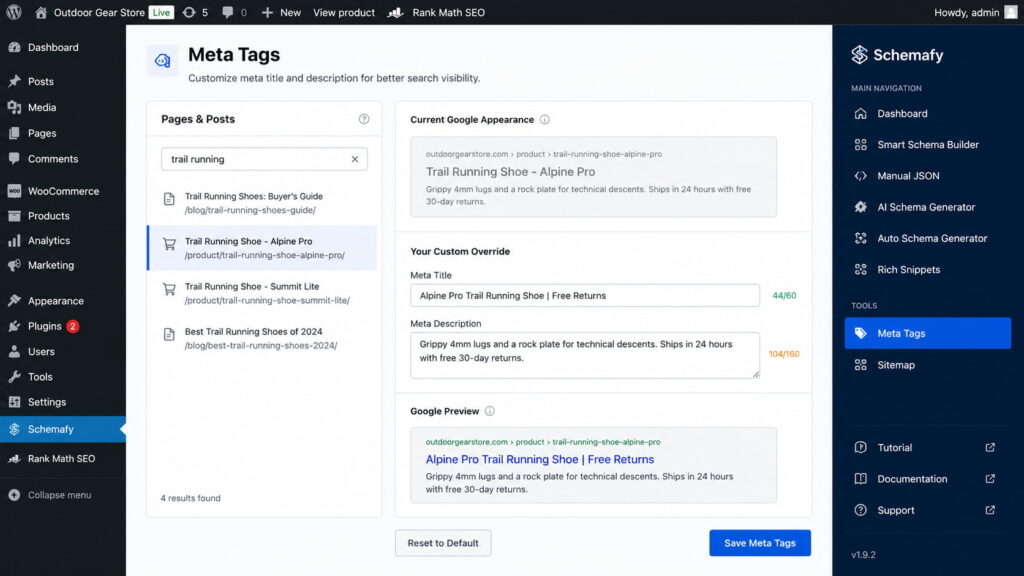
Caption: Character counters and a live Google preview on a single product page; the same fields import in bulk from CSV.
Final thoughts
Crawl budget is an inventory problem wearing a technical costume. You are not looking for a trick that makes Googlebot work harder, you are deciding which URLs deserve to exist and removing the rest from consideration.
The next step is fifteen minutes, not a project. Open Crawl Stats on your largest client property, run the ratio, and look at the Discovery versus Refresh split before you change a single line of robots.txt. Once the crawl is going where you want it, the follow-on work is making those pages earn their place, which is where the broader playbook to increase organic traffic picks up.
Frequently asked questions
Does crawl budget matter for small websites?
For most small sites, no. Google can easily crawl and index sites under about 1,000 pages, and Google has said crawl budget isn’t a concern for most publishers. It becomes important on large sites (1M+ pages) or medium sites (10k+) that change daily. Small sites still benefit from clean architecture.
Does noindex save crawl budget?
Not directly. Google has to crawl the page to see the tag, so the request is spent either way. Over the long run, removing URLs from the index can indirectly free up crawling for other pages. Use noindex to deindex and robots.txt to stop crawling.
How do I increase my crawl budget?
You raise crawl budget by improving crawl capacity and demand: speed up server response, fix 5xx errors, publish and update valuable content, and build internal and external links to important pages. You can’t set a number directly, but a fast, healthy, popular site gets crawled more.
How often does Google crawl my site?
It varies by site. Google crawls popular, frequently updated pages more often and low-value pages rarely. Check the Crawl Stats report in Google Search Console to see your actual crawl frequency, total requests, and average response time over the last 90 days.
Does page speed affect crawl budget?
Yes. Faster pages let Googlebot fetch more of your site in each session, effectively increasing crawl capacity. Slow responses and server errors make Googlebot slow down to avoid overloading your server, so it crawls fewer pages. Rendering time counts as much as response time.
Does your site already have Schema Markup?
Generate structured data by template, with AI or in bulk, and verify it with Google's Rich Results Test — all from WordPress, no code.
- ✓ 16 schema types
- ✓ Free plan, forever
- ✓ Keeps Yoast / Rank Math
Eddie Casas built the first version of Schemafy himself, rough and vibe-coded, to fix a problem he kept hitting in his own SEO work: structured data that took too long to do right. Once the idea proved out, he brought in engineer Fabián Tinjacá to rebuild it into the plugin it is today. He now leads growth, SEO and content at Schemafy, and runs QA on every release before it ships. He is also the founder of TheBaseo, an SEO and AEO agency, so the playbooks on this blog are the ones he runs on real sites, not theory. His take: most schema advice online is written by people who have never had to apply it across hundreds of live pages. Eddie writes for the operator who has.