
What Is Structured Data? A Plain-English Guide to Schema Markup
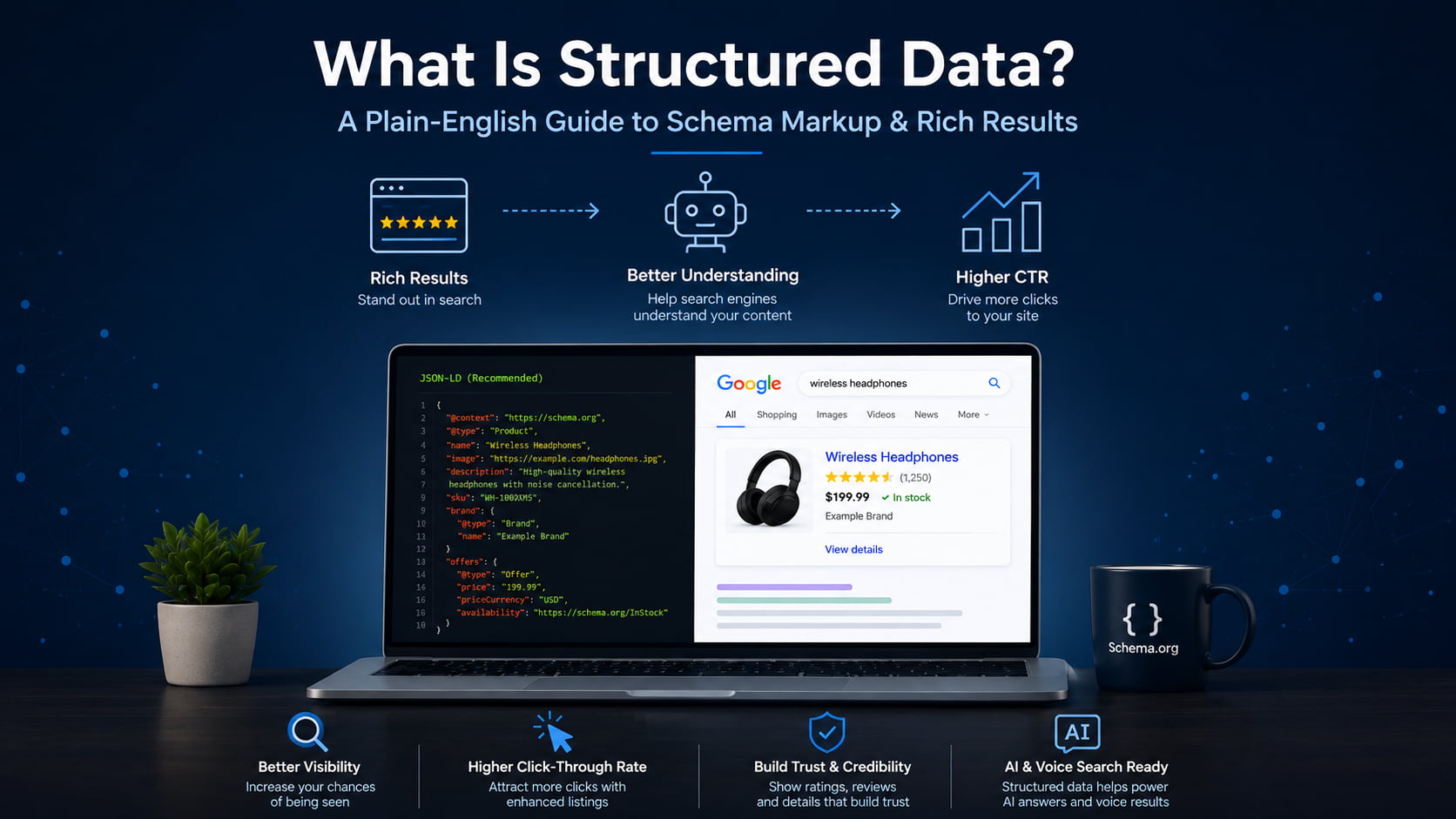
Think of structured data like labels on a shipping container. A machine reads the label and knows what is inside without opening the box. It does the same for your web pages: it tells search engines what your content means, not just what it says.
The term also describes database data, but this guide covers structured data for SEO. Done right, your pages become eligible for rich results, higher click-through, and AI-search citations across every client site you run.
- What is structured data? (quick definition)
- Structured data vs. schema markup vs. rich results
- How structured data works
- Structured data examples (with code)
- Common types of schema markup
- Why structured data matters for SEO and AI search
- How to add structured data to your website
- How to test and validate your structured data
- Common structured data mistakes to avoid
- Get rich-result-ready schema without the code
- Frequently asked questions
What is structured data? (quick definition)
Structured data is a standardized format for labeling the content on a web page so search engines can understand what it means, not just what it says. It uses a shared vocabulary called Schema.org to describe entities like a product, an article, or a business, and it lives in the page’s code where machines read it, invisible to visitors.
That shared vocabulary is the important part. Schema.org gives every entity type an agreed set of properties, so a search engine reading Product knows to look for a name, a price, and a rating in the same place every time.
Back to the shipping analogy. The label does not change what is in the box, it just makes the contents readable without unpacking. On one site, that is a nice-to-have. Across 10 or more client sites, it is the difference between listings that qualify to look better in search and listings that stay plain.
Structured data vs. schema markup vs. rich results
These three terms get blurred constantly, often in the same sentence. Keeping them straight saves you from promising a client something search engines never guaranteed.
Structured data is the concept: labeling content in a machine-readable format. Schema markup is the implementation, the actual code you add using the Schema.org vocabulary. Rich results are the output, the enhanced listing Google may show once it reads valid markup. All schema markup is structured data, but not all structured data is schema markup.
| Term | What it is | Example |
|---|---|---|
| Structured data | The concept of labeling content so machines understand it | Any machine-readable data format, including database tables |
| Schema markup | The implementation using the Schema.org vocabulary | A Product JSON-LD block on a product page |
| Rich result | The enhanced search listing Google may display | A star rating and price shown under a result |
How structured data works
The flow is short. You add the markup to a page. Search engines crawl and parse it. They use it to understand the entities on the page and how those entities relate to each other. Pages that qualify may then earn rich results.
There is a bigger payoff behind that. Google uses structured data it finds on the web to understand the content of a page and to gather information about the world, including the people, books, and companies your markup describes. That information feeds the Knowledge Graph, the map of entities Google fills in as your markup confirms who and what your page is about. If you want the full workflow, see our guide on how to use schema markup.
The three formats: JSON-LD, Microdata, RDFa
Schema.org markup comes in three formats. JSON-LD is a <script> block placed in the head or body, kept separate from the visible HTML. Microdata and RDFa are inline attributes woven directly into your HTML tags.
Each has a trade-off. JSON-LD is clean and easy to edit because it sits apart from your layout. Microdata ties the data to the exact HTML element, which some developers like but makes bulk edits fragile. RDFa is the most flexible for combining vocabularies, and also the most verbose. JSON-LD is by far the most common format today, and you can write or check a block in a JSON-LD editor before it goes live.
Why Google recommends JSON-LD
Google’s position is explicit. It recommends JSON-LD because it is the easiest solution for site owners to implement and maintain at scale, and less prone to user errors.
The reason is the separation. Because the JSON-LD block lives apart from your visible content, changing the page layout does not break the data, and updating the data does not touch the layout. You can inject it through a tag manager or a CMS, which is what makes it maintainable across many sites at once.
Structured data examples (with code)
Here is what schema markup actually looks like. This is a minimal, valid Article block. Every field is labeled in plain English so you can see what it does.
{
  "@context": "https://schema.org",
  "@type": "Article",
  "headline": "What Is Structured Data? A Plain-English Guide to Schema Markup",
  "author": {
    "@type": "Person",
    "name": "Jane Doe"
  },
  "datePublished": "2026-07-24",
  "publisher": {
    "@type": "Organization",
    "name": "Example Media"
  }
}
And here is a Product block with an offer and a rating, the kind of markup that powers e-commerce rich results:
{
  "@context": "https://schema.org",
  "@type": "Product",
  "name": "Premium Yoga Mat",
  "offers": {
    "@type": "Offer",
    "price": "49.00",
    "priceCurrency": "USD",
    "availability": "https://schema.org/InStock"
  },
  "aggregateRating": {
    "@type": "AggregateRating",
    "ratingValue": "4.7",
    "reviewCount": "312"
  }
}
You can build either block by hand, or generate one field by field in a schema markup generator. The property names come straight from Schema.org, and Google documents the requirements for each rich result type in its product structured data docs.
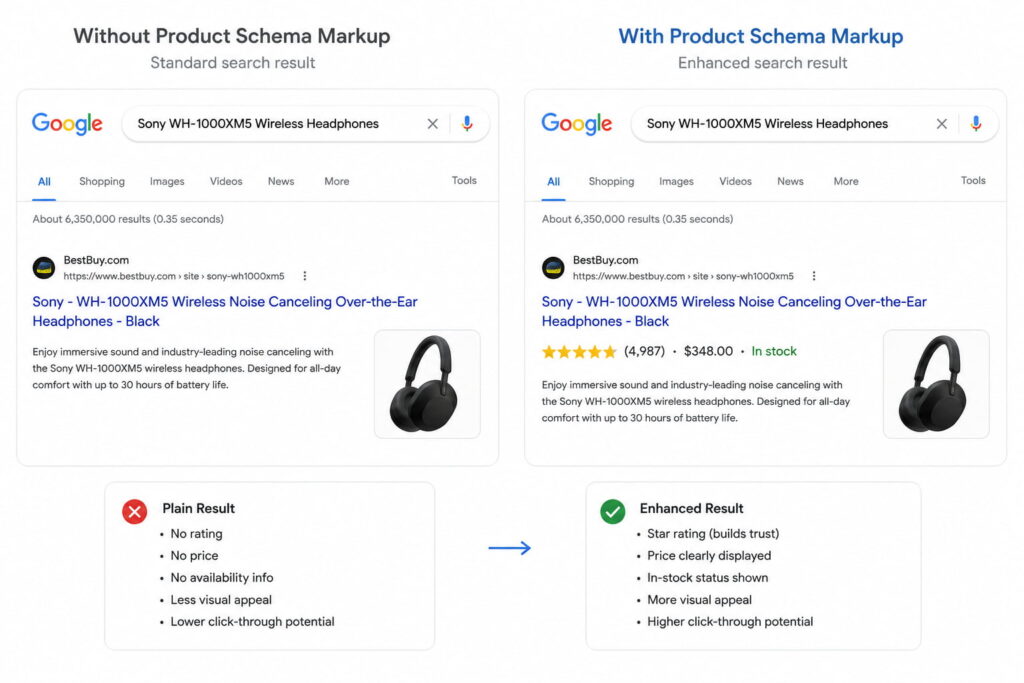
The payoff shows up in the search result. Without markup, a product listing is a title, a URL, and a description. With valid Product markup, Google can add the star rating, the price, and the stock status directly to the listing, which takes up more space and gives shoppers a reason to click before they even land.
Common types of schema markup
Schema.org defines hundreds of types, but a handful cover most of what site owners and stores actually need. Here are the high-value ones, each with the rich result it can earn.
| Schema type | What it labels | Rich result it can earn |
|---|---|---|
Article | Blog posts and news content | Article and headline enhancements |
Product | E-commerce items for sale | Price, availability, star rating |
LocalBusiness | Stores and physical locations | Business info, hours, map details |
FAQPage | Question-and-answer blocks | Expandable FAQ under the listing |
HowTo | Step-by-step tutorials | Step-by-step rich result |
Review / AggregateRating | Ratings and opinions | Star ratings |
BreadcrumbList | Site hierarchy and navigation | Breadcrumb trail in the result |
Organization | Company or brand identity | Knowledge panel and brand details |
Event | Concerts, webinars, meetups | Event date and location card |
Recipe | Cooking instructions | Recipe card with photo and time |
VideoObject | Video content | Video thumbnail and key moments |
Two of these are the easiest wins across a whole site. BreadcrumbList and Organization apply to almost every page, take little effort to set up once, and pay off site-wide. FAQPage markup can surface your questions in the People Also Ask box. If you are rolling schema out across many client sites, starting with the types that apply everywhere gives you the most return per hour.
Why structured data matters for SEO and AI search
Here is the honest version. Structured data is not a direct Google ranking factor. Adding a Product block will not, by itself, move you up the results the way meta descriptions are not a direct ranking factor yet still shape performance.
What it does provide is two things: enhanced listings that earn more clicks, and machine-readable context that helps search engines and AI systems confirm what your page is about. Both are covered below.
Rich results and higher CTR
Rich results are enhanced listings: star ratings, FAQ accordions, prices, breadcrumbs, and recipe cards. They occupy more space in the search results and give people more reasons to click, which lifts click-through rate.
The numbers Google publishes are strong. Rotten Tomatoes added structured data to 100,000 unique pages and measured a 25% higher click-through rate for pages with structured data compared to pages without it. Nestlé found that pages shown as rich results have an 82% higher click-through rate than the same pages without a rich result. Rakuten measured that users spend 1.5 times longer on pages with structured data than on pages without.
One caveat matters. Eligibility is not a guarantee. Valid markup makes a page eligible for a rich result, but Google decides when to show one. You can preview how a listing might look in a SERP preview tool before you publish.
Nestlé found that pages shown as rich results have an 82% higher click-through rate than the same pages without one.
AI Overviews, LLM citations, and entity recognition
This is the part most older guides miss. Structured data helps Google’s Knowledge Graph and AI systems, including AI Overviews and assistants like ChatGPT, Gemini, Perplexity, and Claude, verify entities and surface your content in AI-generated answers.
The mechanism is confirmation, not magic. When your markup states clearly that a page is about a specific product, business, or author, it helps machines confirm what the page is about and how its details relate, which makes your content easier to cite accurately. That is the core idea behind Generative Engine Optimization and answer-engine visibility.
Keep the claims measured. Structured data does not guarantee an AI citation. It gives answer engines cleaner, more reliable context to work with, which is why it sits at the foundation of most answer engine optimization tools and generative engine optimization tools.
How to add structured data to your website
Adding structured data is more approachable than the code makes it look. The process is the same for one page or a thousand:
- Pick the schema type that matches the page (
Productfor a product,Articlefor a post,LocalBusinessfor a location). - Generate the JSON-LD for that type, filling in the real values.
- Paste the block into the page or push it through your tag manager.
- Validate the markup before it goes live.
- Request indexing in Search Console so Google recrawls the page.
You can generate the JSON-LD three ways: by hand, with an online generator, or with a WordPress plugin. Plugins are where non-developers stop worrying about code. Tools like Schemafy include an Auto Schema Generator that scans a site and suggests the right types per page, and an AI Schema Generator that produces the JSON-LD for you, so the markup gets created without hand-writing a line of it.
The step that scales badly is doing this page by page. On a single site it is a Saturday afternoon. Across 10 or more client stores, a per-page approach is why schema projects stall, which is exactly why the at-scale route matters.
How to test and validate your structured data
Two canonical tools cover almost everything. Google’s Rich Results Test tells you whether a page is eligible for a rich result. Schema.org’s Schema Markup Validator checks whether your syntax is correct against the vocabulary.
Understand the difference between the two words they return. “Valid” means the syntax is correct. “Eligible for rich results” means the page also meets Google’s specific requirements for a given rich result type. A page can be perfectly valid and still not be eligible, usually because a required property is missing.
For monitoring at scale, the Enhancements reports in Google Search Console track your markup across the whole site and flag errors by type. That is the report agencies live in, because it catches a broken schema on page 400 that no one would test by hand.
Common structured data mistakes to avoid
Most schema problems come from a short list of avoidable errors:
- Marking up content that is not visible on the page. The markup must describe what the visitor actually sees.
- Missing or mismatched required properties, so the markup validates loosely but fails eligibility.
- Fake or spammy reviews. Marking up reviews you did not earn violates Google’s structured data guidelines and can trigger a manual action.
- Forgetting to update markup when the content changes, so the price or availability in your schema no longer matches the page.
- Stacking multiple conflicting types on one page, which confuses parsers about what the page is really about.
That fourth one bites agencies hardest. When you manage many sites, stale markup piles up quietly. Build the habit of revalidating after any content change, and the problem never compounds.
Get rich-result-ready schema without the code
For teams that do not want to hand-write and validate JSON-LD across a whole site, a WordPress schema plugin can generate and maintain valid, rich-result-ready structured data automatically. That is the practical route when you are keeping schema correct across 10 or more client stores at once, without turning anyone on the team into a JSON-LD engineer.
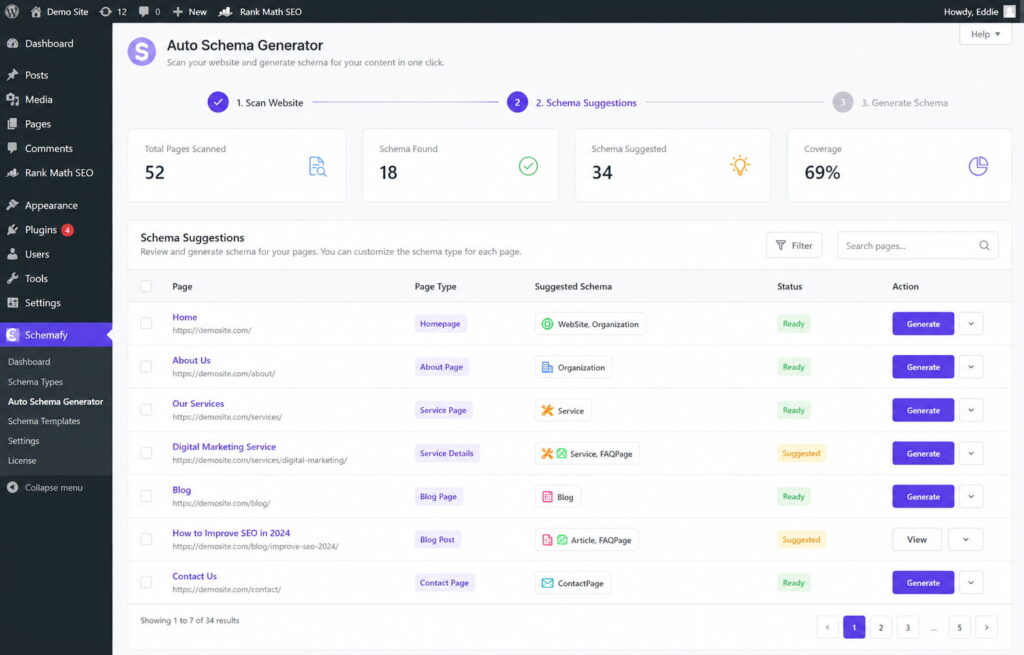
Caption: Schemafy scans a site and suggests the right schema type per page, so structured data gets applied across many products without hand-coding.
Frequently asked questions
What is structured data in SEO?
In SEO, structured data is code (usually JSON-LD using the Schema.org vocabulary) added to a page so search engines understand its content and context. It does not directly boost rankings, but it makes pages eligible for rich results and helps them appear in AI-generated answers.
What is an example of structured data?
A common example is Product schema, which labels a page’s product name, price, availability, and review rating. When the markup is valid, Google can show those details, like a star rating and price, directly in the search result, making the listing more prominent and clickable.
What’s the difference between structured data and schema markup?
Structured data is the general concept of labeling content in a machine-readable format. Schema markup is the specific implementation that uses the Schema.org vocabulary. In short: all schema markup is structured data, but not all structured data uses Schema.org.
Does structured data help rankings?
Structured data is not a direct Google ranking factor. It can help indirectly by earning rich results that raise click-through rates, and by helping search engines and AI systems confirm what your page is about, which improves visibility in rich results and AI Overviews.
What is JSON-LD?
JSON-LD (JavaScript Object Notation for Linked Data) is a lightweight code format for adding structured data to a web page. It sits in a script block separate from visible content and is Google’s recommended format because it is clean, flexible, and easy to maintain.
How do I check if my structured data is working?
Use Google’s Rich Results Test to see if a page is eligible for rich results, and the Schema.org Markup Validator to check syntax. For ongoing monitoring across your whole site, watch the Enhancements reports in Google Search Console.
Final thoughts
Structured data stopped being a technical problem and became an operational one. On a single site, it is a nice-to-have. Across 10 or more client sites or stores, it decides whether your listings, and your clients’ listings, are eligible to look better in search and get confirmed by the AI systems that now answer questions directly.
Start where the return is highest. Pick one high-value type, apply it, validate it, and watch Search Console for the change. Organization and BreadcrumbList apply to almost every page, take little effort to set up once, and pay off site-wide, which makes them the right first move before you touch anything product-specific.
Does your site already have Schema Markup?
Generate structured data by template, with AI or in bulk, and verify it with Google's Rich Results Test — all from WordPress, no code.
- ✓ 16 schema types
- ✓ Free plan, forever
- ✓ Keeps Yoast / Rank Math

Fabián Tinjacá is the CTO of Schemafy and the engineer who turned an early prototype into a production plugin. He owns the technical side end to end: the plugin core, the schema generation engine, releases, and bug fixes. He also built the Schemafy website in Astro. His take: most WordPress SEO plugins are slow because they try to be five tools at once. Fabián builds Schemafy to do structured data and meta well without dragging down the sites it runs on.